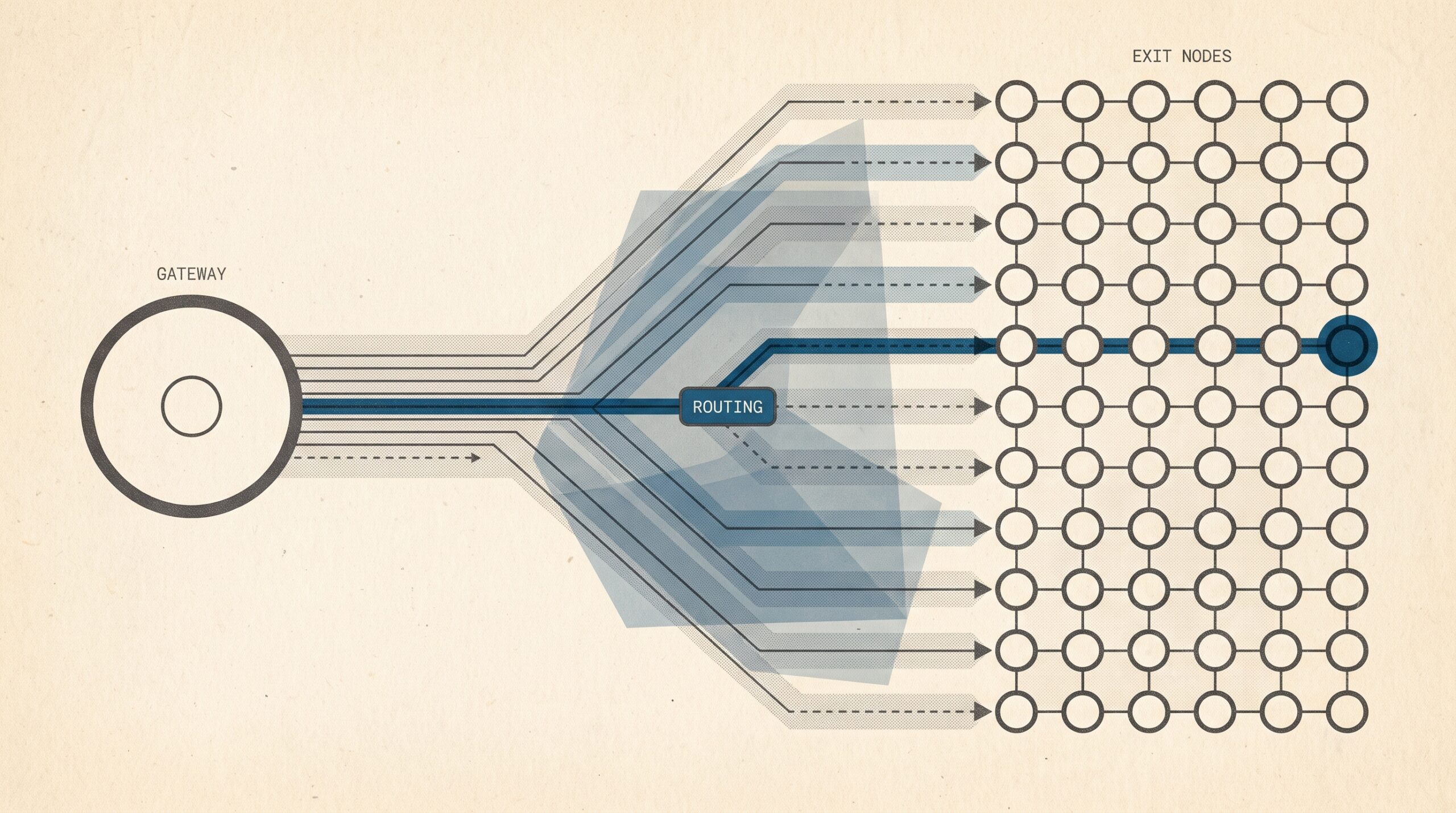
Quick answer: A backconnect proxy is a single gateway endpoint that routes your requests through a pool of proxy exit nodes. You configure one hostname, port, and set of credentials. The gateway chooses the exit IP per request, per session, or after a set time, so you never maintain a list of individual proxy addresses.
Key takeaways:
- Backconnect describes the gateway architecture.
- Rotating describes when the IP changes.
- Sticky describes how long one IP stays assigned.
- Mobile backconnect systems get new IPs by reconnecting physical modems to a carrier’s CGNAT pool.
- No proxy type makes traffic undetectable. Fingerprints, cookies, and behavior still count.
Automated traffic accounted for more than 53% of all web traffic in 2025, up from 51% the year before, according to Imperva’s 2026 Bad Bot Report [6]. Human activity fell to 47%. That shift has made identity management core infrastructure for ad verification, market research, localization testing, and permitted data collection.
The market numbers show the same trend. The Business Research Company projects the global web scraping market to grow from $0.99 billion in 2025 to $1.17 billion in 2026, an 18.5% annual growth rate [9].
This guide covers five topics:
- How backconnect architecture works
- The difference between backconnect, rotating, and sticky
- How mobile backconnect systems get new carrier-assigned IPs through CGNAT
- What published test data does and does not show about exit types
- How US and European buyers who need Mexican or Spanish mobile identities can evaluate providers and stay compliant
Backconnect Architecture and the Difference Between Gateway Access and IP Rotation
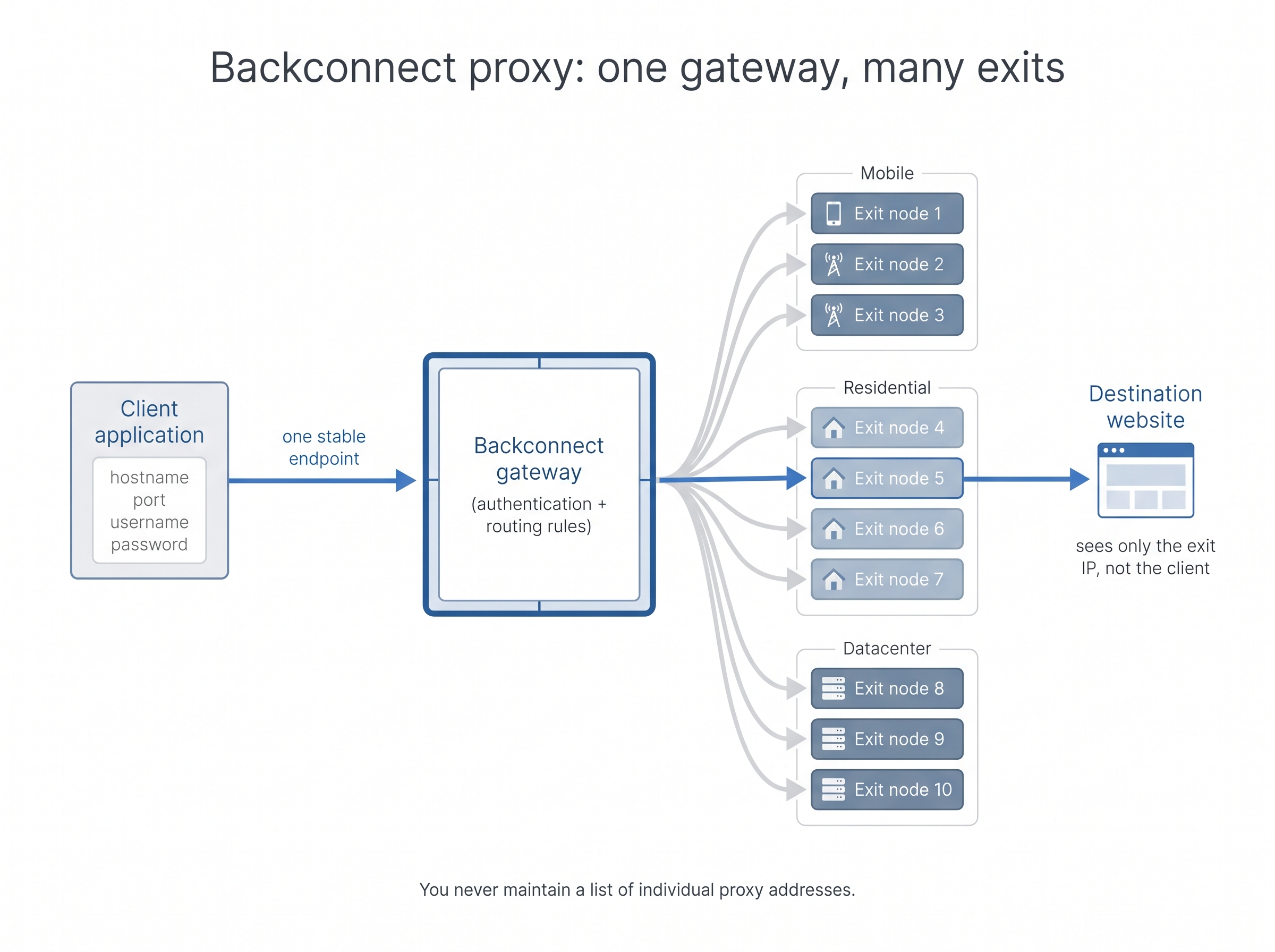
A backconnect proxy is a gateway-based system. The client connects to one endpoint, and the provider routes each request through an exit node selected from a larger pool [1]. The term describes that design: one stable entry point and many exits.
The design matters because websites adapt to high volumes of automated traffic. Bots now generate the majority of web traffic [6], so sending repeated requests from a single static IP is the easiest pattern for a target to rate-limit. A gateway lets you spread legitimate workloads across many exits without changing your code.
How the request lifecycle works
A request moves through a backconnect system in a fixed order:
- You configure a gateway hostname, port, username, and password in your software.
- Your scraper, browser, or application sends a request to the gateway.
- The gateway authenticates the request and applies its routing rules.
- The system selects an exit node based on country, carrier, session, availability, or rotation policy.
- The exit node connects to the destination website.
- The destination responds through the exit node and the gateway.
- You receive the response without needing to know the exit node’s address.
Two components make this work. The backconnect gateway is the stable access endpoint your client talks to. The exit-node pool is the set of proxy IPs that actually reach the destination [1]. The SwiftProxy glossary defines it as “a proxy setup that routes traffic through a pool of proxy servers and can automatically rotate the outgoing IP address.”
Client application
        ↓
Backconnect gateway
        ↓
Exit-node selection layer
        ↓
Mobile, residential, or datacenter exit
        ↓
Destination website
This setup has five operational benefits:
- One configuration point instead of a spreadsheet of IPs
- Centralized authentication
- Country and carrier targeting handled on the server side
- Session rules managed at the gateway rather than in your code
- Much easier scaling than rotating a static proxy list by hand
Public browser-automation tools already assume this model. The Camoufox browser project documents two relevant modes [8]:
- A “single endpoint” mode
- A “backconnect proxy (rotating sticky sessions)” mode, in which each browser context gets its own sticky session through one gateway
Camoufox also derives locale, timezone, and geolocation from the proxy’s IP automatically.
✅ Keep browser identity aligned with the exit IP
If locale, timezone, or geolocation disagree with the exit node’s country, you create a fingerprint mismatch even when the IP looks legitimate. Derive those values from the proxy IP for each sticky browser context, and keep them stable for the life of the session.
Backconnect, rotating, and sticky are not synonyms
These three terms are often used as if they mean the same thing, and that confusion leads to buying mistakes. Treat them as a buying framework, because they answer three different questions:
| Term | What it describes | Typical behavior | Best-fit use case | Important limitation |
|---|---|---|---|---|
| Backconnect proxy | Gateway architecture | One endpoint routes to multiple exits | Scalable scraping, browser automation, geo-testing | Does not specify rotation timing |
| Rotating proxy | IP-change behavior | IP changes per request, session, or time interval | High-volume collection and distributed requests | Frequent changes can break authenticated sessions |
| Sticky session | Session persistence | Same exit stays assigned for a defined period | Login flows, carts, dashboards, multi-step browsing | A persistent IP may build up reputation issues or hit rate limits |
- Backconnect answers: “How do I access the pool?”
- Rotating answers: “When does the IP change?”
- Sticky answers: “How long does the same IP stay assigned?”
ProxyTitan draws the line clearly. “Rotating” describes IP-changing behavior, while “backconnect” describes a common gateway architecture used to deliver a pool [2]. A backconnect service usually rotates, but rotation does not require a gateway. A script that cycles through a list of individual proxy endpoints is still rotating.
Rotation itself has several modes. DataImpulse lists the following [3]:
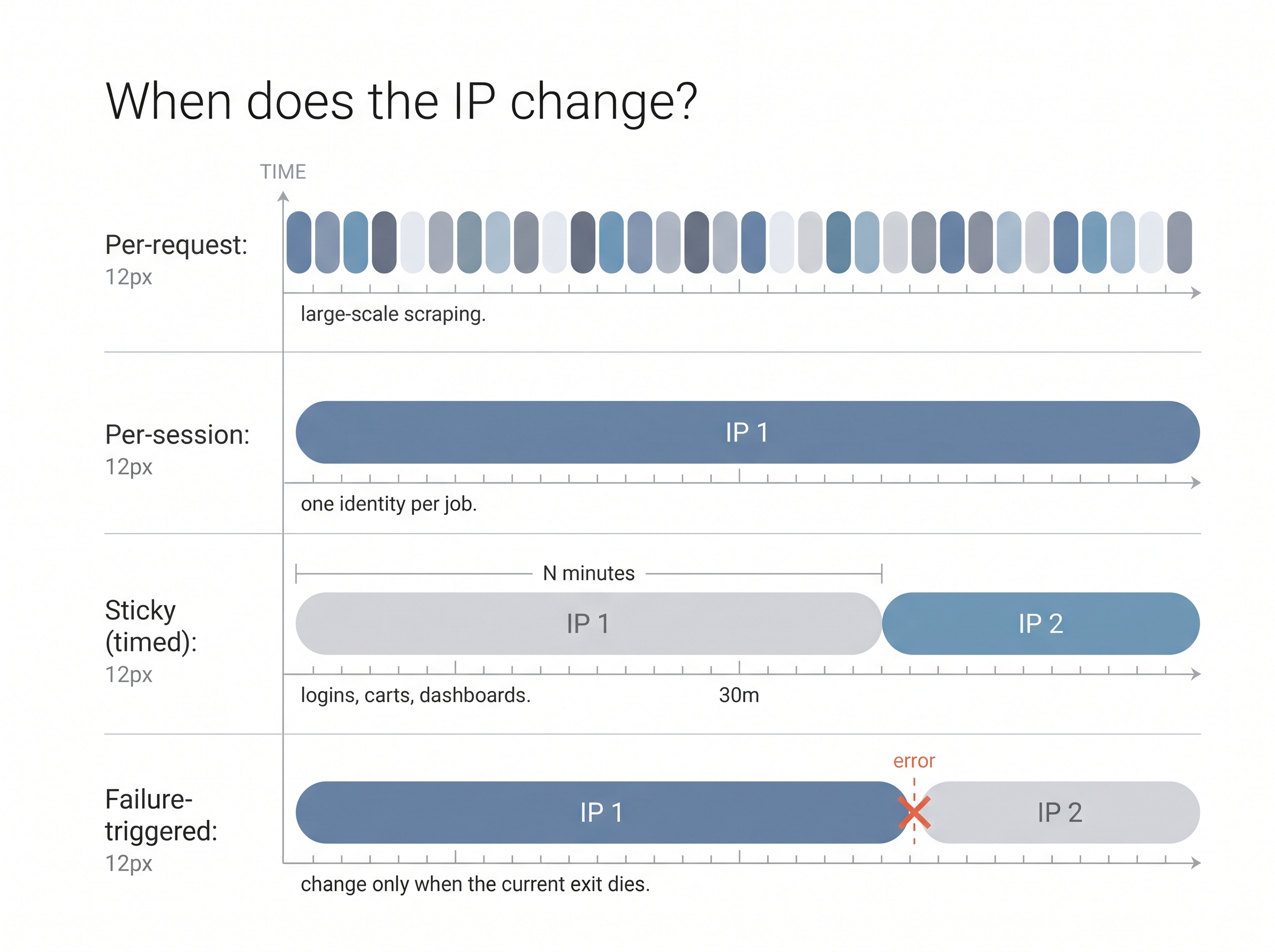
- Per-request rotation: a new IP for each request, suited to large-scale scraping
- Per-session rotation: one IP held for the whole session
- Sticky sessions: one IP held for a set number of minutes
- Random or failure-triggered rotation: the IP changes when the current one stops responding
One common misconception needs correcting. Buyers often assume every backconnect product rotates on each request and cannot hold a session. In practice, many gateways support sticky sessions explicitly [8].
Ask about session controls before you buy:
- Short sticky windows work for catalog crawls.
- Longer sticky windows work for logged-in dashboards, ad-verification walks, and social-account workflows.
- Custom durations per job reduce broken sessions and wasted bandwidth.
Configuration and protocol considerations
Two protocol families dominate:
- HTTP/HTTPS proxies understand and forward web requests.
- SOCKS5 is a transport protocol that passes traffic without interpreting it at the HTTP layer. This makes it more flexible for non-HTTP workloads.
“Backconnect SOCKS5” therefore means a backconnect gateway accessed over SOCKS5. It is not a separate architecture.
Before buying, check these integration details:
- Whether DNS is resolved on the gateway side or the client side
- The authentication method
- IPv4/IPv6 behavior
- Timeout controls
- How precise the geographic targeting is, for example country-level versus carrier-level targeting for Mexico and Spain
These details often decide whether integration takes an hour or a week.
How Mobile Backconnect Proxies Rotate IPs Through CGNAT
Mobile backconnect rotation usually works by reconnecting a physical modem to the carrier network. The carrier gives the modem a different address from its CGNAT pool, and the gateway then makes that new mobile IP available as an exit. The IP change happens at the network level, not only in software.
The hardware-level rotation process
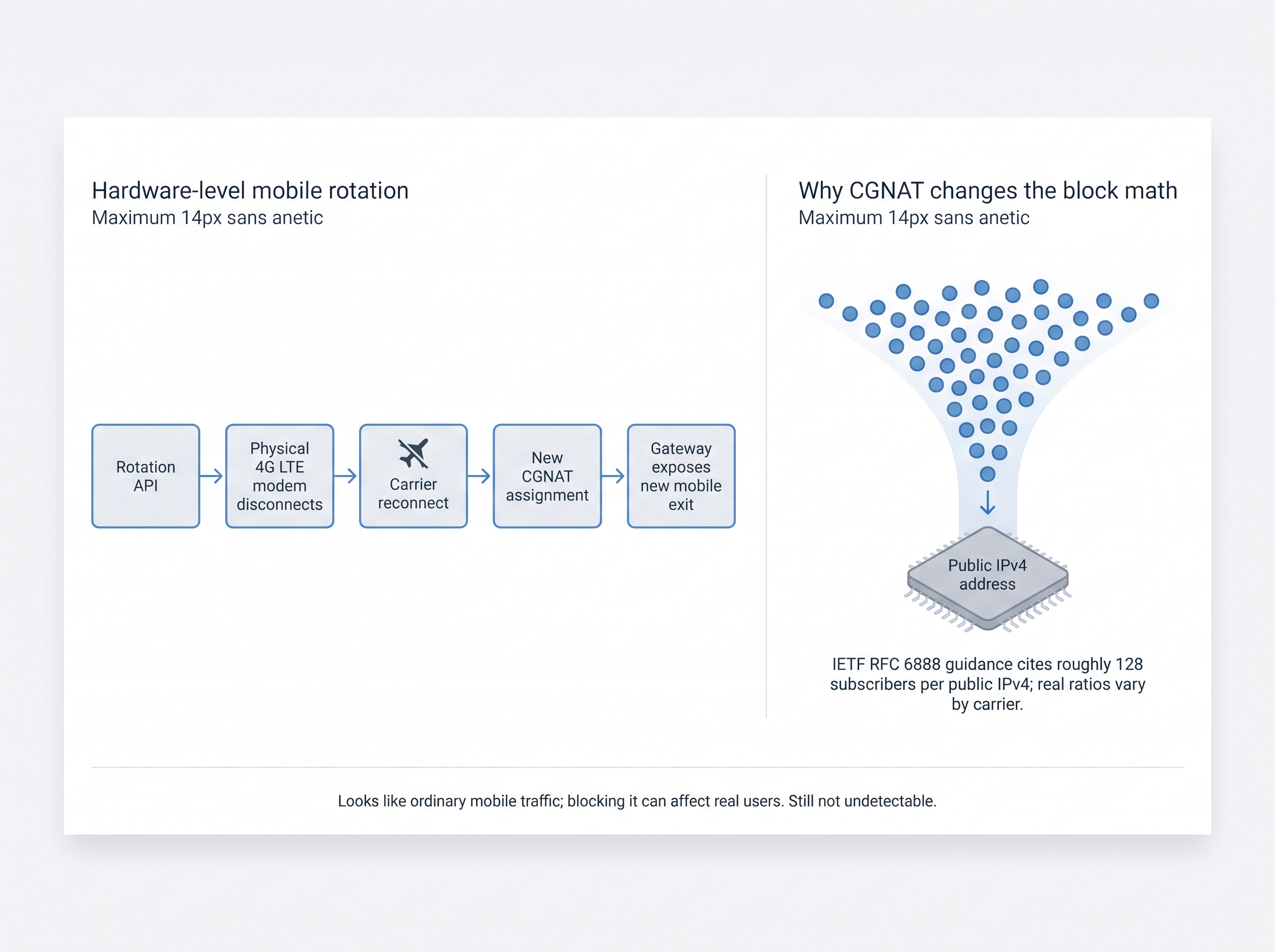
The process runs as follows:
- You send a rotation command through the provider’s dashboard or API.
- The proxy controller tells the assigned modem to disconnect.
- The modem reconnects to the mobile carrier.
- The carrier authenticates the SIM and assigns a new network address.
- The carrier’s CGNAT layer maps the private subscriber connection to a shared public IPv4 address.
- The gateway updates its record of available exit nodes.
- New requests use the newly assigned mobile identity.
MobileProxies.org describes this flow: an API call “triggers a hardware-level modem reconnection. The physical modem disconnects from the carrier network and reconnects, receiving a new IP address from the carrier’s CGNAT pool” [4].
A familiar comparison is airplane mode. Toggling airplane mode on a phone forces it to disconnect from the cellular network and reconnect, which often produces a new IP. Physical modem rotation works the same way. Commercial operations run racks of modems controlled by software, not people tapping phone screens.
Rotation API command
        ↓
Physical 4G LTE modem disconnects
        ↓
Carrier network reconnect
        ↓
New CGNAT assignment
        ↓
Gateway exposes new mobile exit IP
Why CGNAT affects anonymity and block resistance
Carrier-grade NAT (CGNAT) lets many subscribers share one public IPv4 address. IETF RFC 6888 provides the operational guidance for this kind of address sharing. Industry commentary citing it notes deployment guidance that caps sharing at roughly 128 subscribers per public IPv4 address [5]. Treat that figure as a reference point rather than a fixed rule, because actual ratios vary by carrier, region, and network design.
This has two practical consequences:
- Your traffic exits from an address that looks like an ordinary mobile-carrier IP, not a cloud-hosting range.
- Blocking that address is costly for the target site, because one shared carrier IP can serve many legitimate subscribers.
There is a firm limit, though. None of this makes an IP “undetectable.” Websites can still evaluate browser fingerprints, cookies, TLS characteristics, behavioral patterns, account history, and request timing.
⚠️ A shared carrier IP is not stealth
CGNAT makes a block more expensive because one public IPv4 can serve many real subscribers. It does not hide browser fingerprints, TLS traits, cookies, or request timing. Treat HTTP 429 as a pacing and behavior signal, not proof that you merely need a new IP.
OWASP’s bot management guidance recommends device and network fingerprinting specifically because it catches bots that rotate IPs while reusing the same client environment [10]. The same guidance advises defenders to return generic 429 Too Many Requests responses with no diagnostic detail. If your logs show a 429 error, assume the cause is your overall behavior, not just your IP.
What buyers should verify
Before committing to a mobile backconnect provider, confirm six things:
- Physical SIMs vs. peer-sourced devices. Provider-operated modems and third-party device networks have very different consent and reliability profiles. Ask for documentation.
- API-triggered reconnection vs. software-only reassignment. A modem reconnection gives you a new network identity. Software-only reassignment may just switch you to another IP that was already in the pool.
- Carrier country vs. geolocation-database country. An IP that databases place in Spain or Mexico is not necessarily on a Spanish or Mexican carrier.
- Rotation command availability and actual completion time. Measure the real time from your rotation call to a working new exit. Do not rely on marketing claims.
- IP reuse. Find out whether another customer can hold the same address at the same time.
- Documented carrier, modem, and uptime practices. Vague answers here usually predict vague performance later.
A practical pilot test for Mexican or Spanish mobile exits
Before signing a long contract, run a short trial on your own workload:
- Request a trial port targeted to the specific country, and to the carrier if offered.
- Call an IP-lookup service through the gateway. Record the IP, the ASN owner, and the reported country.
- Confirm that the ASN belongs to a mobile carrier in that country, not a hosting provider.
- Trigger 10–20 rotations. Log the time each one takes to complete and count how many IPs repeat.
- Hold a sticky session for the length of your real workflow and check that the IP does not drift.
- Run a small, rate-limited sample against your actual target and compare status codes.
This takes under an hour. It shows how the network actually behaves on the targets you care about, which a sales page cannot.
Mobile, Residential, and Datacenter Backconnect Performance
No proxy category is best for every job:
What each backconnect exit type is actually good for
| Option | Pros | Cons |
|---|---|---|
| Datacenter | Fast, predictable infrastructure and strong simple-target connectivity; efficient for permitted high-throughput internal tests. | Hosting-provider ranges are easy for targets to scrutinize; a connectivity test on an unprotected file says nothing about bot defenses. |
| Residential | Consumer-like network identity for sites that filter hosting ASNs; useful for broad market sampling when sessions are handled carefully. | Peer-sourced pools raise consent and documentation questions; published tests rarely measure logins, JS challenges, or reputation. |
| Mobile | Carrier CGNAT identity matches ad-verification and localization work; blocking one shared mobile IP is costly for the target. | Quality hinges on carrier, signal, modem load, and real rotation time; mid-session IP changes break logins and confuse geolocation. |
- Datacenter exits often offer speed and predictable infrastructure.
- Residential and mobile exits can better match the network identity that targets expect when they scrutinize hosting-provider IP ranges.
Published test data supports a narrower conclusion than many vendors claim.
What a published connectivity test shows
DataImpulse published a one-off connectivity test on October 16, 2026 (15:12–15:21 UTC). The test setup was:
- 2,000 requests per proxy type
- A 9 KB static file on cdnjs as the target
- US exits with rotating IPs
- Python Requests 2.31.0 with 10 parallel workers
A request counted as successful only if it returned HTTP 200 and the complete file.
| Exit type | Result | Test context | What the result does and does not prove |
|---|---|---|---|
| Residential | 1,999 of 2,000 successful (99.95%) | US exits; 9 KB cdnjs file; Python Requests 2.31.0; 10 parallel workers | Basic connectivity to an unprotected file |
| Datacenter | 1,997 of 2,000 successful (99.85%) | Same target, time window, software, and request volume | Datacenter exits also handle simple targets reliably |
Interpret these figures carefully. This is a single connectivity check against an unprotected static file, not a general performance benchmark. Both exit types performed almost perfectly, and a difference this small on an easy target tells you nothing about difficult ones.
The test does not show that residential proxies beat datacenter proxies on protected sites. It did not measure:
- Bot-detection systems
- Login stability
- JavaScript challenges
- Account reputation
The test also tells you nothing about mobile exits. Mobile performance depends on carrier, signal quality, modem load, and rotation timing, so measure it on your own targets before committing.
Why IP type is only one detection signal
Anti-automation systems look at much more than your address:
- Browser and device fingerprint
- TLS and network characteristics
- Cookie continuity
- Request timing and navigation sequence
- Header consistency
- Account behavior
- IP reputation and ASN classification
- Rate-limit patterns
OWASP describes the mechanism directly: fingerprinting exists to flag clients that rotate IPs but keep the same underlying environment [10]. If you change the IP and leave everything else identical, a competent defense will still recognize you.
Spreading requests across many IPs through a backconnect gateway reduces single-IP bans. It works best alongside realistic pacing and consistent session handling, not in place of them. This matters most for ad verification and social workflows. A session that jumps between carriers mid-flow looks less like a real user than one that stays on a stable sticky exit.

Match exit type to task
| Task | Recommended exit characteristic | Reason |
|---|---|---|
| Public, low-risk data collection | Datacenter or residential | Speed and cost may matter more |
| Ad verification | Mobile or location-matched residential | Better match with carrier or consumer identity |
| Multi-step authenticated workflow | Sticky mobile or residential | Preserves session continuity |
| Broad market sampling | Rotating residential or mobile | Spreads requests across identities |
| High-frequency internal testing | Datacenter | Predictable throughput and infrastructure |
Compliance, Ethical Sourcing, and Provider Selection for US and European Buyers
A backconnect proxy is not legal or illegal in itself. Compliance depends on five factors [7]:
- The data you collect
- The target’s terms and access controls
- Your purpose
- The provider’s sourcing practices
- Applicable privacy law
With the web scraping market growing at 18.5% a year [9], procurement and privacy teams are reviewing proxy vendors more closely.
Compliance checklist for US and European businesses
Work through this list before any production deployment:
- Document the purpose. Record why the organization needs proxy access and what data it will collect.
- Review target permissions. Check terms of service, robots directives, authentication requirements, rate limits, and contractual restrictions.
- Avoid collecting excess personal data. Collect only what the stated business purpose requires.
- Establish a lawful basis where required. Processing covered by GDPR may need a documented lawful basis and a data-minimization process.
- Request a DPA. Confirm the provider offers a data processing agreement that covers applicable GDPR and CCPA/CPRA obligations [7].
- Verify IP sourcing. Ask whether residential or mobile identities come from consenting device owners, provider-owned SIMs, or another documented source. DataHen’s guidance is direct: ethically sourced residential proxies have documented consent from device owners, and unethically sourced ones do not [7].
- Review acceptable-use rules. The provider should explicitly prohibit credential theft, fraud, spam, unauthorized access, and evasion of security controls.
- Set retention controls. Define how long collected data, logs, credentials, and proxy records are kept.
- Control access. Use separate credentials, least-privilege permissions, and audit logs.
- Escalate sensitive work. Involve legal or privacy counsel for regulated data, authenticated scraping, or cross-border processing.
This is an operational checklist, not legal advice.
How to evaluate a backconnect proxy provider
| Criterion | Questions to ask | Why it matters |
|---|---|---|
| Exit-source transparency | Physical SIM modems, consenting devices, or third-party pools? | Reduces sourcing and reputation risk |
| Rotation control | Per-request, per-session, sticky, or API-triggered? Custom session length? | Prevents broken sessions and wasted requests |
| Geography | Country, carrier, and city-level targeting available? | Essential for ad verification and localization |
| Reliability | What uptime, latency, and failure metrics are reported, and is there a contractual SLA? | Determines operational cost |
| Protocols | HTTP, HTTPS, SOCKS5, authentication, DNS behavior? | Determines integration compatibility |
| Compliance | DPA, acceptable-use policy, sourcing documentation? | Supports procurement and privacy review |
| Support | API documentation and technical support available? | Reduces implementation time |
| Pricing | Per GB, per port, per IP, per modem, or subscription? | Allows like-for-like comparison |
Two selection mistakes are especially common.
Choosing on pool size and price alone. Large pools fail the jobs that matter if they lack session control or targeting for the country you need. A million-IP pool is worth less than a smaller, well-documented network if it has any of these problems:
- No Mexican or Spanish carrier coverage
- Poor sourcing
- Unreliable rotation
Ignoring sourcing transparency. Sourcing documentation determines whether the vendor relationship survives your own compliance review [7].
Configuration examples and operational safeguards
Integration is deliberately simple. In Python, define the proxy once:
proxy = {
    "server": "http://gateway.example.com:PORT",
    "username": "USERNAME",
    "password": "PASSWORD"
}
In Playwright, pass the same proxy object when you launch the browser or create a context:
browser = await p.chromium.launch(proxy=proxy)
# or per-context:
context = await browser.new_context(proxy=proxy)
After setup, follow these operating rules:
- Respect destination rate limits.
- Use realistic concurrency.
- Keep sticky sessions for authenticated workflows.
- Rotate only when the task requires it.
- Monitor error rates and status codes continuously, and treat a rise in 429 errors as a signal to slow down.
- Never use proxy rotation to bypass authentication, access controls, fraud systems, or contractual restrictions.
Limitations, alternatives, and professional guidance
Be realistic about what a mobile exit provides:
- It does not guarantee access or prevent blocking.
- CGNAT does not hide browser fingerprints or account behavior [10].
- Changing the IP mid-session can break login flows and create inconsistent geolocation signals.
- For permitted, low-risk, high-throughput workloads, datacenter proxies are often more efficient.
- Residential peer pools may raise more sourcing and consent questions than provider-owned SIM infrastructure [7].
Legal requirements vary by jurisdiction, sector, and data type. Get professional privacy or legal review if your work involves:
- Personal data
- Regulated industries
- Authenticated scraping
- Cross-border processing
Frequently Asked Questions
#### What is a backconnect proxy?
A backconnect proxy is a gateway that routes requests through a pool of proxy exit nodes. You configure one endpoint, and the gateway selects the exit IP according to rules such as country, session, carrier, or rotation interval [1]. This simplifies scaling because the client never maintains a separate list of proxy addresses.
#### How does a backconnect proxy work?
Your application sends traffic to the gateway, which forwards it through a selected exit node. The destination website sees the exit node’s IP instead of yours. Depending on configuration, the gateway may keep the same exit for a session, rotate after a set time, or pick a different exit for each request [3].
#### What is the difference between a backconnect and a rotating proxy?
Backconnect describes the gateway architecture, while rotating describes how the IP changes. A backconnect gateway can provide rotating or sticky sessions. A rotating proxy service may also offer individual proxy endpoints without any gateway [2]. Ask separately about gateway access, rotation timing, session persistence, and exit-node type.
#### What are sticky sessions in a backconnect proxy?
A sticky session keeps one exit IP assigned to a client for a defined period. Sticky sessions suit login flows, shopping carts, dashboards, and other multi-step workflows that may fail when the IP changes [3]. Session length, reconnection behavior, and limits depend on the provider.
#### How do mobile backconnect proxies rotate IPs?
Many mobile systems rotate by reconnecting a physical modem to the carrier network. The modem disconnects, reconnects, and may receive a different address through the carrier’s CGNAT infrastructure [4]. An API or dashboard command can start the process. How long it takes depends on the carrier, signal quality, modem, and provider architecture.
#### Are backconnect proxies legal to use in the United States?
Using a backconnect proxy is not illegal in itself, but the activity carried out through it may create legal or contractual risk. Review target permissions, privacy obligations, data-collection limits, provider sourcing, and acceptable-use rules [7]. Get professional advice for personal data, authenticated access, regulated industries, or cross-border processing.
#### What is the difference between mobile, residential, and datacenter backconnect proxies?
The main difference is the network source behind the gateway. Mobile exits use carrier networks, residential exits use home internet connections, and datacenter exits come from hosting infrastructure. Mobile and residential identities may better match consumer traffic, while datacenter proxies usually offer predictable speed and capacity.
#### Do backconnect proxies prevent bot detection?
Backconnect proxies reduce reliance on a single IP, but they do not prevent bot detection. Websites may also evaluate browser fingerprints, TLS signals, cookies, request timing, account history, and navigation behavior. Responsible automation combines sensible rate limits, consistent session handling, and testing, rather than relying on IP changes alone.
#### How many IPs should a backconnect proxy pool have?
The pool size you need depends on request volume, target rate limits, session length, and geographic requirements. A small pool may be enough for low-volume testing, while large-scale collection needs more diversity and careful concurrency controls. Ask the provider about unique available exits, reuse rates, carrier distribution, and how unavailable IPs are replaced.
#### How do I choose a backconnect proxy provider?
Evaluate exit-source transparency, rotation control, geography, uptime, protocol support, compliance documentation, and technical support. Check four things in particular:
- Whether the provider documents physical SIM infrastructure or relies on third-party pools
- Whether sessions can stay sticky
- Whether your target country is genuinely covered at carrier level
- Whether billing and usage limits are clearly stated
Conclusion
Backconnect, rotating, and sticky answer three separate questions:
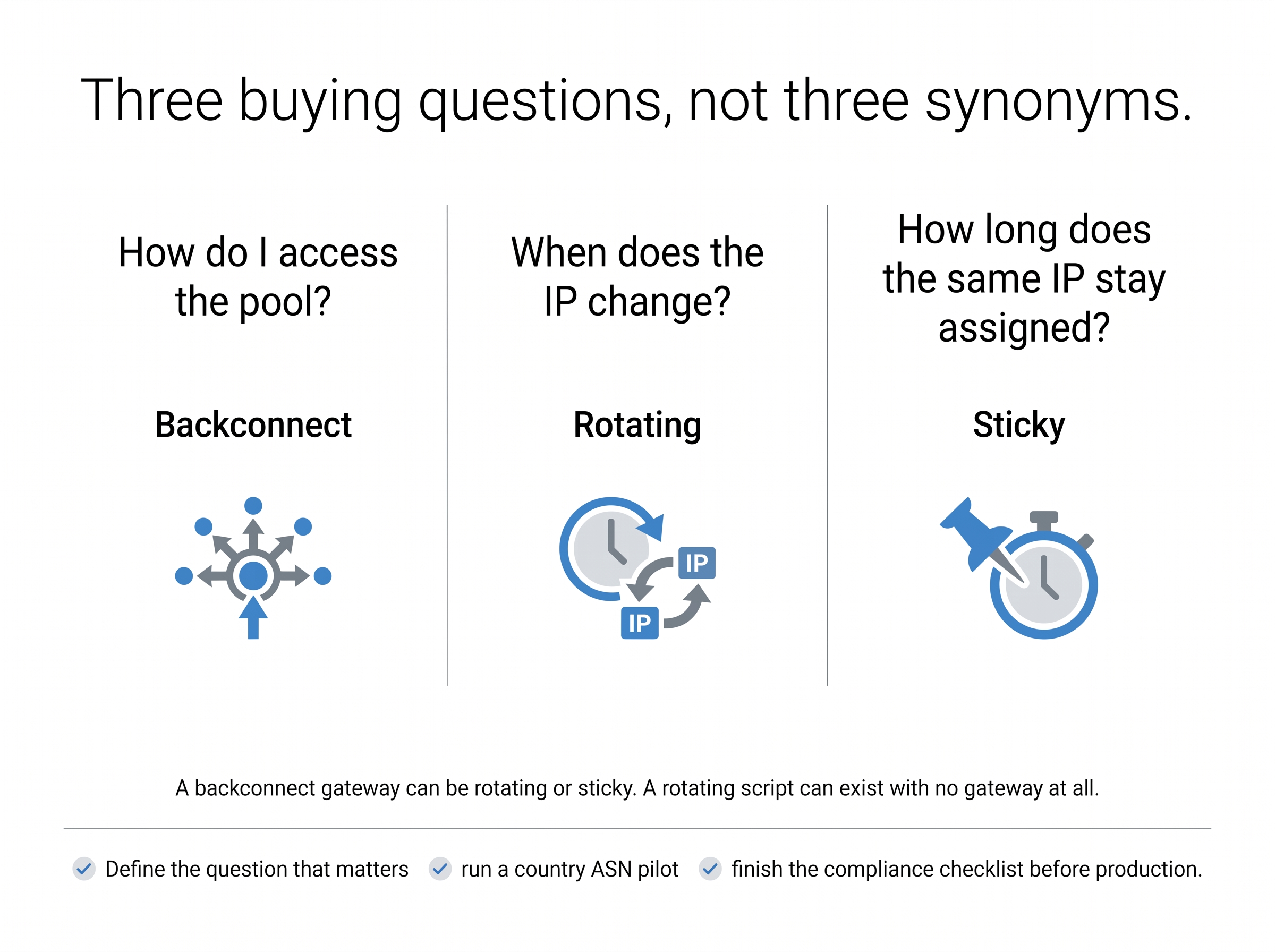
- Backconnect describes an architecture: one gateway, many exits.
- Rotating describes when the IP changes.
- Sticky describes how long it stays the same.
Treating them separately removes most buying confusion.
Mobile backconnect systems add a distinct mechanism: physical modem reconnection that gets a fresh carrier-assigned address through CGNAT. Even so, the right exit type depends on your task, your target, your session requirements, and your compliance obligations. IP rotation is one part of responsible automation, not a substitute for it.
Your next steps:
- Define which of the three questions matters most for your workload.
- Run the pilot test above on your real targets.
- Complete the compliance checklist before production.
If your work requires Mexican or Spanish mobile identities for ad verification, localization testing, or social media management, apply the same checklist to every provider you consider, including ProxyServer.tech. See how a mobile proxy works in practice and judge the mechanics for yourself.
About the Author
ProxyServer.tech Team
We’re the ProxyServer.tech team. We write about what we know best, aiming to explain it clearly and help you decide with information you can trust.
Transparency Statement
This guide draws on technical explanations, published test data, compliance guidance, and practitioner discussions from the sources listed below. Test results are presented with their original conditions and should not be applied to every target or provider. Compliance information is educational and does not replace advice from qualified legal or privacy professionals. Community discussions illustrate practitioner concerns; they are not independently verified performance evidence.
References
[1] Build Your Own Rotating Residential Proxy Pool Using Devices You Already Own | Localtonet Blog
[2] What Are Rotating Proxies? How They Work [2026 Guide]
[3] What Is a Backconnect Proxy and When Should You Use It? | Blog DataImpulse
[4] IP Rotation Best Practices for Proxies
[5] Blog & Insights | Torch Proxies | TorchProxies
[6] Bad Bot Report 2026: Bots in the Agentic Age | Imperva
[7] Are Proxy Servers Legal? A Global Compliance Guide for Businesses
[9] 8 Best HTTP Proxy Providers in 2026 (Compared & Ranked) | Live Proxies
[10] Bot Management and Anti-Automation – OWASP Cheat Sheet Series