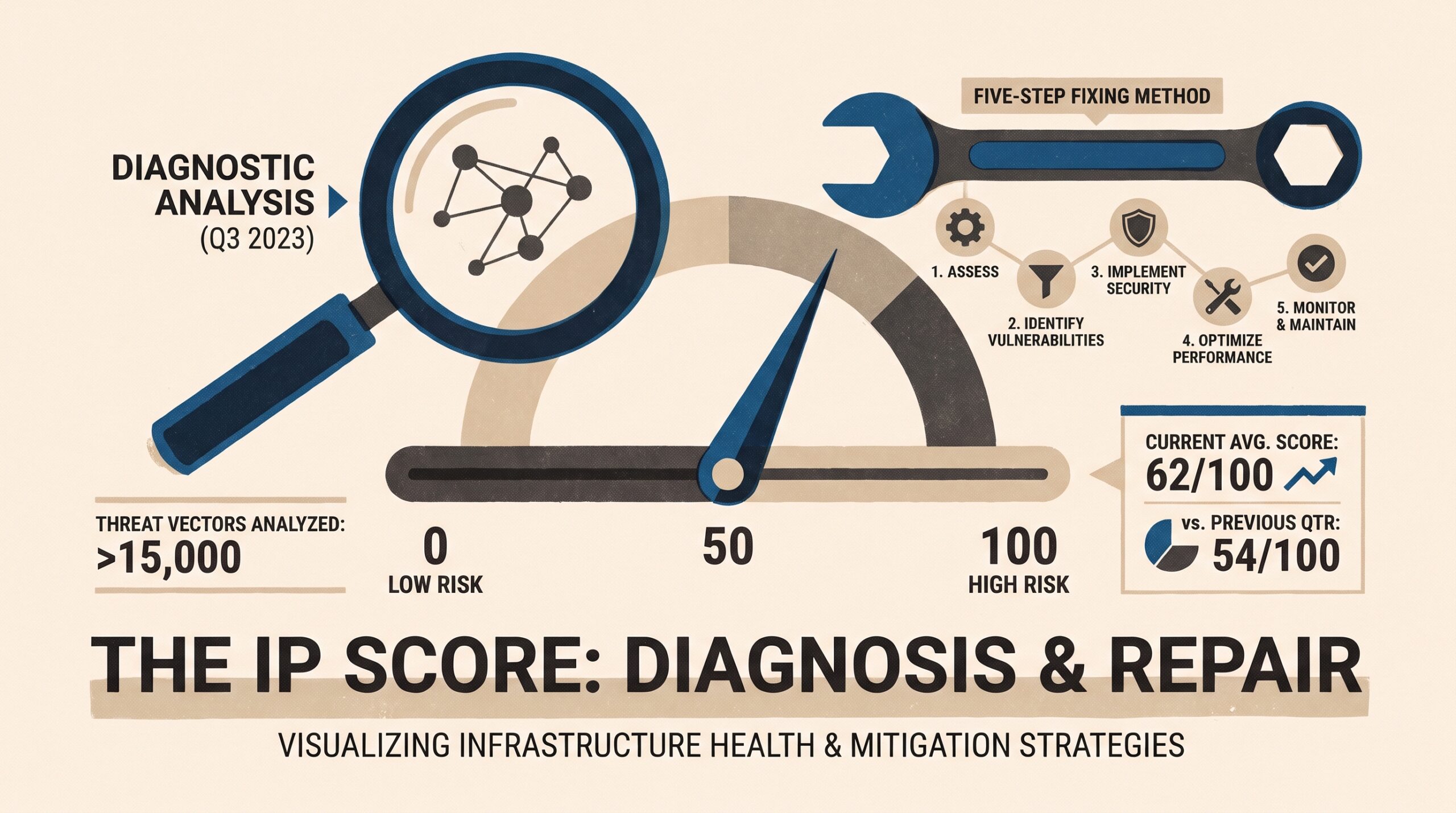
Key takeaway: An IP score is a vendor-specific estimate of how risky an IP address appears. It draws on network type, past abuse signals, proxy or VPN detection, geolocation consistency, and related network data. Vendors do not share a single scale or direction. IPQualityScore and Scamalytics use 0–100, where higher means riskier, while other vendors use different ranges. A high IP fraud score is often inherited from shared or recycled infrastructure rather than caused by the current user. To fix it, identify the cause, verify the result across tools, and use an IP type that fits the task.
Introduction: Why Your IP Score Can Affect Access, Advertising, and Automation
An IP score is a numerical risk estimate assigned by fraud-prevention, anti-bot, and IP-intelligence vendors. For digital marketers, SEO specialists, and data teams, that number can determine whether ad verification, localized scraping, or social-media sessions run smoothly or hit CAPTCHAs, rate limits, account checks, or blocks.
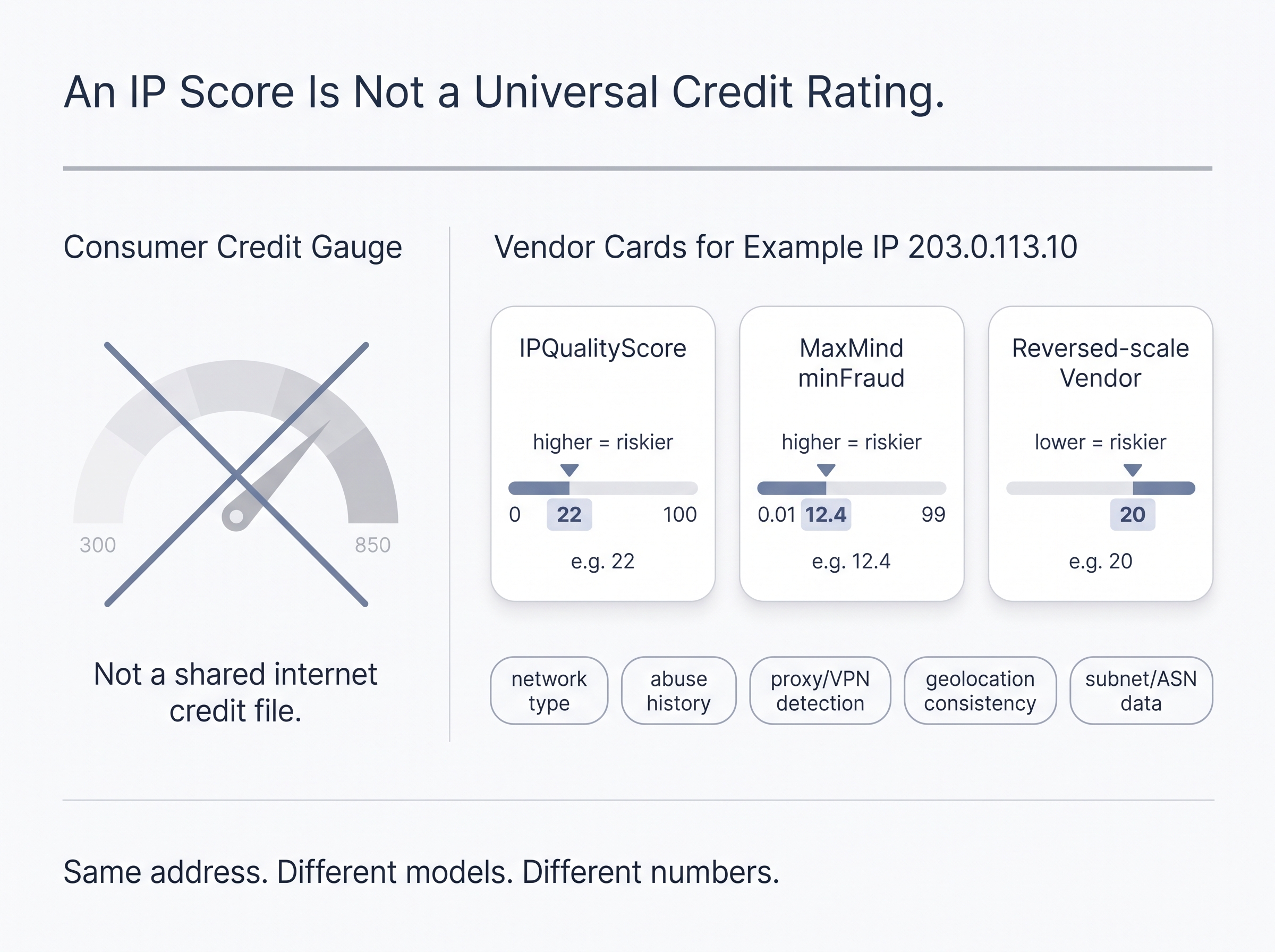
Many guides treat the score as a universal credit rating for the internet. It is not one. The score varies by provider, by context, and by the signals each platform can observe. Even the scale differs between vendors.
MaxMind’s minFraud documentation states that its IP risk score runs from 0.01 to 99, with a higher number meaning higher risk. Some reputation vendors reverse the direction, so a lower number signals more risk. A “20” can be reassuring in one dashboard and alarming in another.
⚠️ Read the scale direction before you act
A 20 can look healthy on a 0–100 higher-is-riskier scale and alarming on a vendor that reverses the logic. MaxMind minFraud runs from 0.01 to 99 with higher meaning more risk; other products invert that direction. Confirm range and direction in the dashboard you are using before changing infrastructure.
This guide covers:
- What common score scales mean
- How scores, reputation, and proxy flags differ
- How to check an IP score with multiple tools
- Why a legitimate user may carry a high score
- How anti-bot systems use IP intelligence
- A five-step method for fixing a poor result
Before you try to fix a score, you need to know what the number measures.
What an IP Score Means on a Fraud-Risk Scale
An IP score (also called an IP fraud score, IP quality score, or IP risk score) is a model-generated estimate of how likely an IP address is to be associated with abuse, anonymization, automation, fraud, or suspicious network characteristics. Scores are not standardized across vendors, so a 40 on one platform cannot be compared with a 40 on another.
One industry breakdown describes the most common approach: “IP Reputation Scoring: Assign a score from 0 to 100 based on historical behaviors (such as spam and fraudulent transactions)” (Detailed Explanation of 5 Major IP Scoring and Detection). IPQualityScore uses this 0–100, higher-is-riskier model, and each vendor weights its own signals [1]. Check the direction of a scale before you act on a number.
How IP fraud-score bands are commonly interpreted
The bands below apply to 0–100 scales where a higher score means more risk, such as IPQualityScore and Scamalytics. IPQualityScore’s proxy detection best-practice documentation treats scores of 75 or above as suspicious and notes that medium-risk proxy and VPN connections tend to fall around 70–75.
| Illustrative score band | Typical interpretation | Recommended operational response |
|---|---|---|
| 0–20 | Low apparent risk | Keep monitoring; validate other signals before sensitive actions |
| 21–50 | Moderate or contextual risk | Review connection type, location consistency, and account behavior |
| 51–74 | Elevated risk | Expect some challenges, lower trust, or extra verification |
| 75–100 | Suspicious or high risk (IPQS threshold) | Investigate proxy/VPN/datacenter detection, abuse history, and subnet reputation |
These bands show how vendors present their output. They are not an industry-wide standard. Typical inputs include [1]:
- VPN, proxy, Tor, or hosting-provider detection
- Autonomous System Number (ASN) and network type
- Historical abuse and spam reports
- Botnet or malware associations
- Geolocation and timezone consistency
- Recent traffic velocity or suspicious behavior
- Neighboring IP and subnet reputation
Typical scores by IP type, and why these are only tendencies
| IP connection type | Common fraud-scoring perception | Why it may be scored this way |
|---|---|---|
| Mobile carrier IP using CGNAT | Often low apparent risk when clean | Shared carrier infrastructure is hard to attribute to one individual |
| Residential ISP IP | Variable | Can look consumer-authentic but may be reused or present in proxy networks |
| Consumer VPN exit IP | Often elevated when detected | Shared exits and known VPN ranges are easy to classify |
| Datacenter / cloud IP | Often elevated | Hosting ASNs are common sources of automation and bulk traffic |
| Tor exit node | Often very high | Publicly known anonymization infrastructure |
ProxyPoland’s comparison of connection types reports that public checkers rate VPN and datacenter IPs as high risk, while mobile carrier IPs tend to come back clean “because they cannot be attributed to a single user due to CGNAT” [6]. These are proxy-industry observations, not guarantees from scoring vendors or destination sites.
Why the number alone is insufficient
Read a score together with its proxy, VPN, and Tor flags; ASN and ISP class; country and city consistency; browser and device signals; rate limits and account behavior; and the target site’s own risk rules [10]. A 35 with a datacenter flag can perform worse than a 60 on a residential ASN with a messy history. The context determines the outcome.
IP Score, IP Reputation, Fraud Score, and Proxy Flags: The Differences That Matter
Three separate concepts often get merged into one number:
- IP reputation: the historical trust context associated with an IP address, ASN, or subnet.
- IP fraud score: a contextual risk estimate calculated at lookup or transaction time.
- Classification flags: labels such as proxy, VPN, Tor, datacenter, residential, or mobile. They describe the connection but do not determine risk on their own.
The three-layer IP risk model

| Layer | What it answers | Example data points | What it does not prove |
|---|---|---|---|
| Reputation | “What history is associated with this network identity?” | Spam reports, abuse history, subnet quality, past automation | That the current user is malicious |
| Fraud score | “How risky does this request appear in context?” | IP type, historical data, geolocation, anonymizer status, velocity | That fraud is certain |
| Classification flag | “What type of connection appears to be in use?” | VPN, proxy, Tor, hosting ASN, mobile carrier | That the IP will be blocked |
IPQualityScore states the distinction directly: “IP reputation is a broad trust signal based on historic behavior. IP fraud scoring is a contextual, real-time risk assessment that includes behavior, network, anonymizer use, geolocation integrity, and abuse history” [2].
Why a proxy label does not automatically mean a bad score
A detected proxy is a classification result. The fraud score is the platform’s interpretation of risk. AnyIP’s explanation of Scamalytics output makes the difference clear. The fraud score “is a 0–100 risk estimate based on reported fraud and network reputation,” while the proxy, VPN, or Tor label “is a classification flag from detection feeds that shows what the address appears to be. It describes the address and doesn’t rate its risk” [3].
Mobile, VPN, residential, and datacenter connections can all be labeled as intermediary infrastructure and still receive very different scores, because their ASNs, histories, usage patterns, and subnets differ. Sites also tend to combine IP classification with behavioral and browser-level signals rather than block on a single flag [4].
Why subnet cleanliness matters more
Practitioners increasingly describe a “neighbor effect,” where an IP is assessed partly by the behavior of nearby addresses in its subnet. A frequently rotated address in a heavily abused /24 range can perform worse than a stable address from a cleaner carrier or ISP range.
This is a practitioner observation, not a published vendor rule, and scoring vendors rarely disclose how much weight they give to neighboring addresses. It does explain a common pattern: two IPs from the same provider, one fine and one toxic, that differ only in subnet. ASN and ISP reputation work the same way, and residential ISPs typically carry stronger baseline trust than cloud hosting providers [10].
With the terms defined, the next step is to check whether a score is consistent across tools or reflects only one vendor’s view.
How to Check an IP Score and Verify the Cause of a High Result
Check the IP through at least two risk or reputation sources. Then compare the score with the connection classification, ASN, country, proxy/VPN status, WebRTC exposure, and browser fingerprint consistency. Record the date, tool, score, and flags, because results change as vendor datasets update.
Run a multi-tool IP score check
| Tool or category | What to inspect | Best use | Limitation |
|---|---|---|---|
| IPQualityScore lookup | Fraud score, proxy/VPN/Tor detection, abuse-related flags | Fast initial fraud-risk view | Vendor-specific score logic |
| Scamalytics lookup | Fraud score and proxy classification | Cross-checking risk classification | Different data coverage and thresholds |
| PixelScan | Browser, IP, fingerprint, and automation signals | Detecting browser/IP mismatch | Not a full payment-fraud score |
| BrowserLeaks | WebRTC, DNS, browser and network leaks | Checking whether the environment exposes conflicting data | Requires interpretation |
IPQualityScore offers a free lookup tool alongside its API, so an initial check costs nothing [2]. Practitioners commonly use PixelScan and BrowserLeaks to confirm whether an environment matches the IP’s apparent location [6]. Free tools that flag proxy, VPN, Tor, and datacenter indicators are best for quick triage, not for a final verdict.
Record the evidence before making changes
✅ Snapshot the environment before you rotate
Vendor datasets refresh continuously, so last week’s score may not match today’s lookup. Capture public IP, timestamp, ASN, ISP, country, score, anonymizer flags, and whether the destination challenged the session. Three annotated screenshots—fraud lookup, PixelScan, and BrowserLeaks—are usually enough; omit customer IPs and live logins.
Before you rotate anything, capture:
- Public IP and timestamp
- Country, city, ISP, ASN, and network category
- Fraud score and vendor notes
- Proxy/VPN/Tor/datacenter flags
- Browser timezone and language
- DNS and WebRTC results
- Whether the target site challenged, rate-limited, or blocked the session
This log turns a vague access problem into a diagnosis. For internal documentation, three annotated screenshots are usually enough: the fraud-score lookup (score, ISP, ASN, anonymizer flags), PixelScan (language, timezone, IP country, automation clues), and BrowserLeaks (WebRTC and DNS mismatches). Do not include real customer IPs, account IDs, or active login sessions.
If the score stays high across several tools, the cause is often inherited infrastructure risk rather than anything the current user did.
Why a Legitimate User Can Have a High IP Fraud Score
A high IP fraud score does not prove that you committed fraud. The risk often comes from a previous user of the IP, a shared network pool, a flagged ASN, compromised devices, or the same address being resold across several proxy networks. This is the most misunderstood aspect of IP scores, and it regularly alarms teams that did nothing wrong.
Inherited IP risk from recycled or shared addresses
Four mechanisms account for most inherited-risk cases:
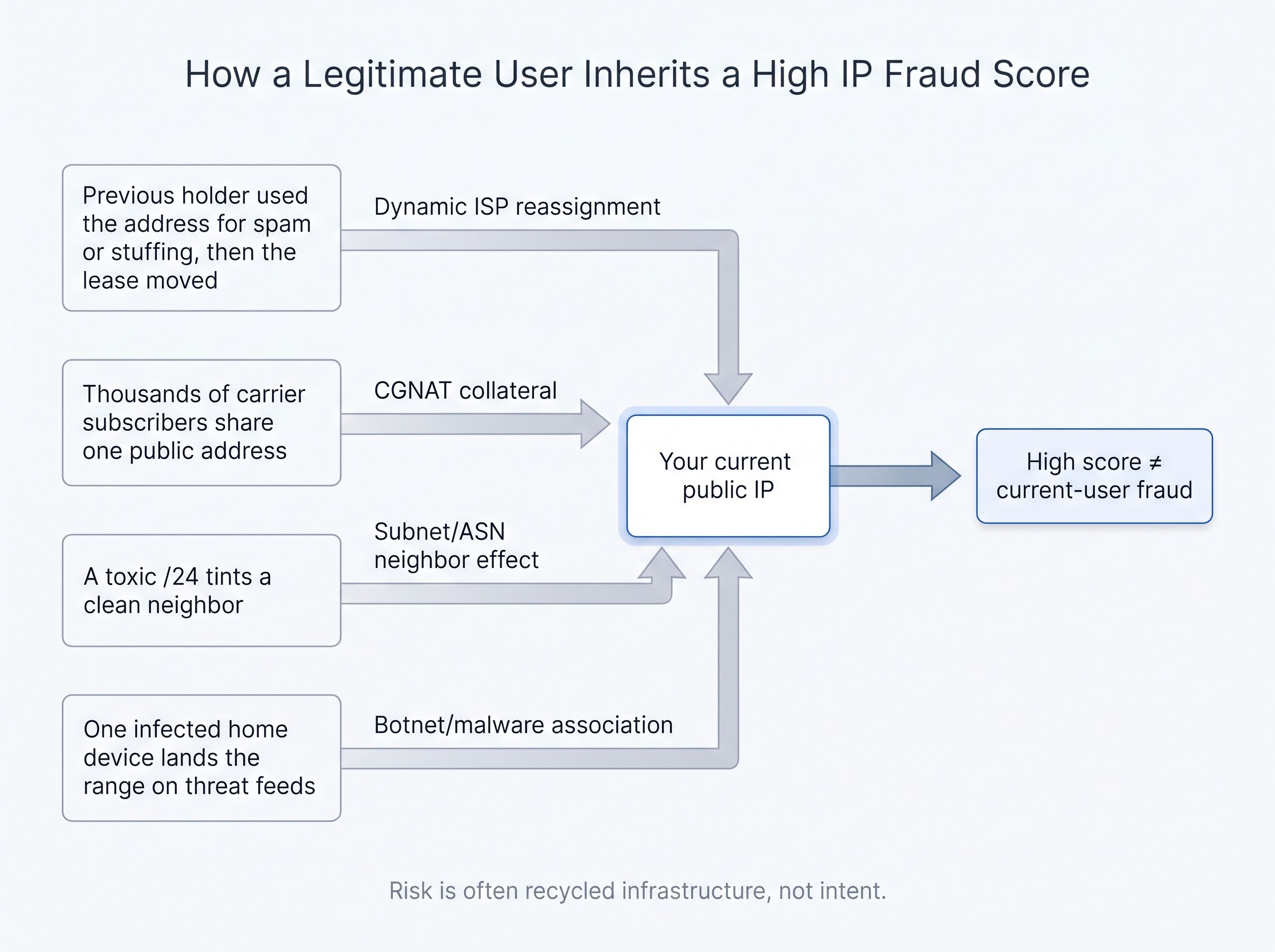
- Dynamic ISP reassignment. ISPs recycle addresses. The previous holder of your current IP may have used it for spam, credential stuffing, or aggressive scraping.
- CGNAT collateral effects. On carrier networks, thousands of legitimate users share public address space. This makes attribution difficult and occasionally pulls clean users into a messy reputation pool [5].
- Subnet or ASN reputation. Even a clean IP can be affected by neighboring addresses or a known hosting range [10].
- Botnet and malware associations. Malware on a single home device can place an address, or an entire range, on threat feeds.
Residential proxy infrastructure churn
Residential-looking infrastructure is not automatically clean. The same residential IP can appear in several proxy providers’ pools at once. When an address is repeatedly repackaged this way, detection vendors see inconsistent use patterns and rapidly changing associations. The score reflects that history, not your intentions.
Why legitimate marketing and scraping teams still get flagged
These common workflows trigger high-risk assessments:
- An ad-verification analyst runs checks from a cloud VM behind a VPN exit node.
- An SEO crawler rotates aggressively through a known datacenter ASN.
- A social-media team manages many accounts from one IP in a short window.
- A scraper presents a Mexican IP, but browser locale, timezone, DNS, or WebRTC reveal a different region [10].
- A team buys “residential” access without checking whether the same IPs are shared across many suppliers.
None of these is fraud, but each looks like fraud to an outside system. That matters because many platforms apply risk scores before evaluating the full behavior of a session.
How Anti-Bot and Fraud Systems Use IP Scores Before Behavior Is Fully Evaluated
IP intelligence usually acts as an early filter. Platforms use IP reputation, classification, geolocation, and network ownership as inputs before they assess behavior. A concerning score does not always lead to a block. It can instead trigger lower rate limits, step-up verification, CAPTCHAs, transaction review, or closer inspection of the rest of the session.
Shifter states the consequence plainly: “A low-reputation IP gets a CAPTCHA or a block before behavioral analysis even runs” [4]. Anti-bot vendors such as Cloudflare, Akamai, and DataDome treat reputation as one input to their bot decision, while fraud engines such as MaxMind minFraud focus on payment and account-abuse risk [4].
Where IP scoring fits in a layered defense model
A typical sequence looks like this:

- Edge assessment: IP reputation, ASN, geolocation, and known anonymizer checks.
- Protocol and device assessment: TLS, HTTP, browser, and fingerprint consistency.
- Behavioral assessment: request velocity, navigation patterns, credential attempts, and account actions.
- Business-rule assessment: payment risk, ad fraud, chargeback exposure, or account abuse.
This matches OWASP’s Bot Management and Anti-Automation Cheat Sheet, which recommends layering defenses across edge, application, and business logic; applying rate limits at the IP, identity, and endpoint levels; and using TLS and HTTP fingerprints before heavier browser fingerprinting [9]. Blocking at the edge also reduces the compute cost of downstream WAF policies, which is why IP signals run first.
Why platforms cannot trust residential or mobile labels alone
Two pieces of evidence show why network type is a signal rather than a verdict.
MaxMind analyzed chargeback-reported transactions and found that “of the chargeback-reported transactions that were anonymized, at least 70% traced to residential proxies.” Across all chargeback-reported transactions, roughly one in three involved a residential proxy detected through active probing [7].
Bot data points the same way. 24metrics, citing Imperva’s 2024 Bad Bot Report, notes that about a quarter of bad bot traffic (25.8% in 2023) originated from residential ISPs [8]. Imperva’s 2025 report shows that share fell to 21% in 2024. The share is not rising every year, but it remains large enough that residential origin cannot be treated as proof of legitimacy.
Legitimate localization work still needs residential or mobile traffic. Anti-fraud teams know fraudsters buy residential proxies too, so they evaluate network type together with fingerprint, behavior, and history.
Business impact for legitimate teams
| Workflow | Likely impact of a poor IP score |
|---|---|
| Ad verification | Inaccurate ad renderings, geo-mismatch, blocked impressions |
| Web scraping | CAPTCHAs, throttling, incomplete datasets, higher retry costs |
| Social media management | Verification prompts, login challenges, reduced account trust |
| E-commerce QA | Checkout challenges or fraud-review false positives |
| Search monitoring | Biased or incomplete localized SERP results |
The goal is not to manipulate a score artificially. It is to correct avoidable technical mismatches and choose infrastructure that suits the workflow.
How to Fix a Bad IP Score in Five Practical Steps
Treat a poor IP score as a diagnosis problem. Do not keep retrying a blocked workflow, and do not assume rapid rotation will solve it. First determine whether the underlying issue is IP history, IP classification, browser inconsistency, account behavior, or a mismatch between the task and the network type.
Step 1: Confirm the score across multiple sources
Run the IP through at least two fraud or reputation lookups. Compare the score, proxy/VPN flags, ASN, ISP, country, and city. Check each tool’s scale direction, because a high number does not mean the same thing on every platform. Save the results with a timestamp. If only one vendor reports a problem, treat that as a reason to investigate rather than as final proof.
Step 2: Diagnose the likely failure mode

| Finding | Likely cause | First response |
|---|---|---|
| High score + datacenter classification | Hosting ASN or known cloud range | Switch to an appropriate ISP or mobile network type |
| High score + VPN flag | Recognized VPN exit | Use a connection type that suits the workflow |
| Country mismatch | Browser, timezone, DNS, or WebRTC inconsistency | Align environment signals with the intended location |
| Clean IP but repeated blocks | Rate, account, or fingerprint issue | Reduce concurrency and audit automation behavior |
| Multiple tools show poor subnet/ASN reputation | Inherited or network-level risk | Move to a cleaner provider or network pool |
Step 3: Correct environment mismatches
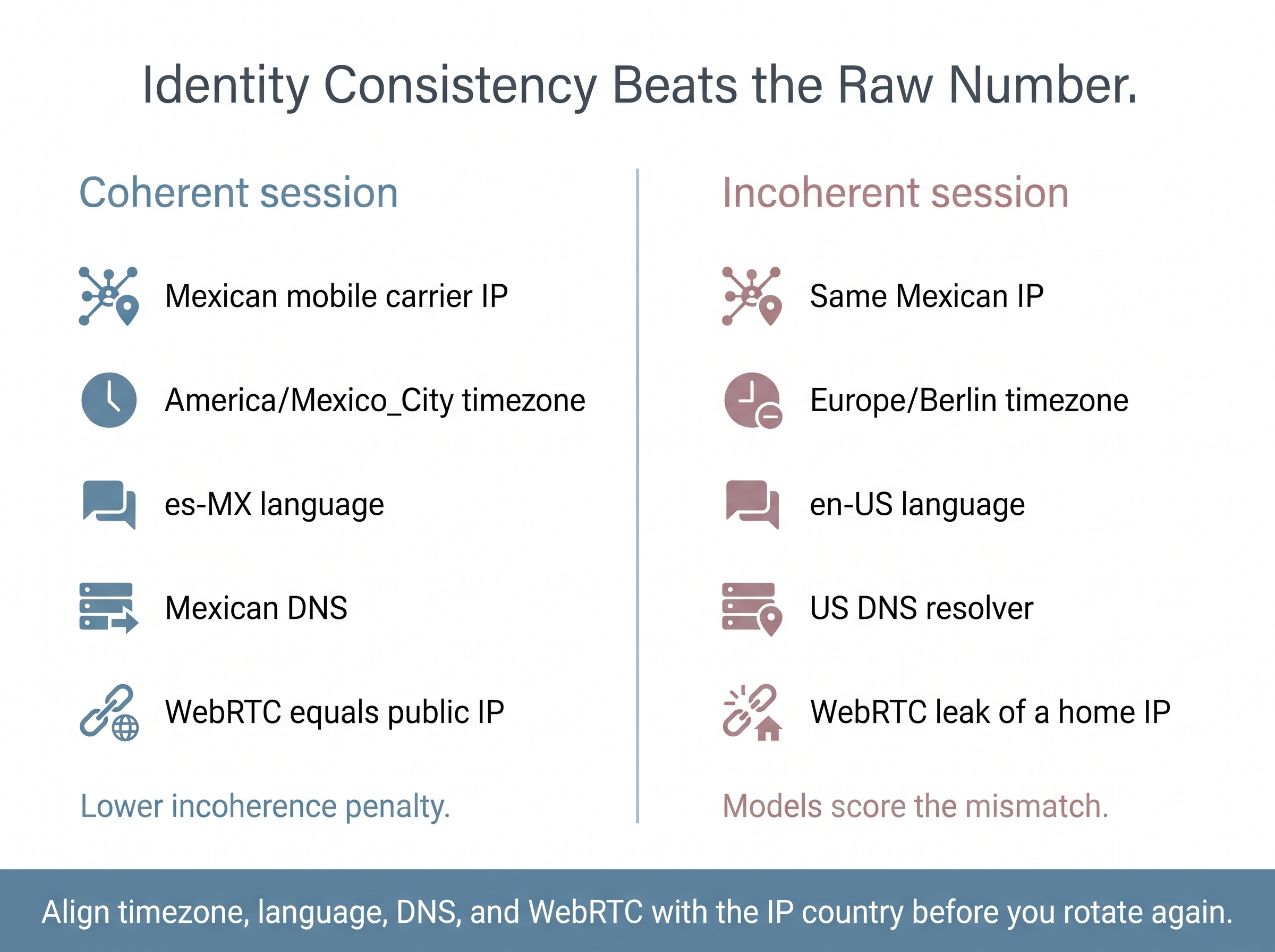
Many “bad score” problems are really consistency problems. Align browser timezone, language, DNS resolver, and WebRTC behavior with the IP’s country. A Mexican carrier IP paired with a Central European timezone and a US DNS resolver is incoherent, and fraud models score incoherence [10].
Step 4: Change the infrastructure deliberately
Stop using known VPN or datacenter infrastructure when the destination expects consumer-like connectivity. Rotate the IP or provider only after you know why the previous one failed. Blind, high-frequency rotation spreads the problem across more addresses.
For workflows that genuinely require Mexican or Spanish mobile-network identity signals, carrier-network mobile proxies are a structural alternative worth evaluating. Under CGNAT, mobile traffic “mixes with thousands of legitimate users,” and platforms cannot easily tell one subscriber from another because everyone shares the same carrier IP pool [5]. Blocking a carrier IP would affect real customers, which gives carrier IPs a degree of natural protection that datacenter ranges lack [5][6]. Carrier IPs can still be flagged if their history, subnet, or session behavior is poor.
Step 5: Validate the full identity again
Recheck the score, proxy flags, DNS, WebRTC, timezone, locale, and how the destination site responds. Log the new results next to the originals so the team can see what actually changed.
No honest provider promises guaranteed scores, bypasses, or platform acceptance. Test your IP environment first. If mobile carrier infrastructure fits your Mexican or Spanish localization work, compare ProxyServer.tech’s mobile proxy options against your verified requirements.
Frequently Asked Questions About IP Scores
What is a good IP fraud score?
It depends on the vendor’s scale. IPQualityScore and Scamalytics use 0–100 with higher meaning riskier, so low numbers are better, and IPQS treats 75 or above as suspicious. Other vendors use different ranges, and some reverse the direction. Treat the score as a risk signal rather than a pass/fail verdict, and review its supporting flags.
Why is my IP fraud score high if I have done nothing wrong?
A high score can come from the IP address, ISP range, or shared network rather than from anything you did. Someone else may have used a dynamic address before it was assigned to you, and shared carrier or ISP infrastructure can carry collateral reputation. Check whether the address is classified as a VPN, proxy, datacenter, or known high-risk subnet.
How do I check my IP score?
Use at least two risk-intelligence tools and compare their explanations rather than relying on one number. Review the fraud score, ISP, ASN, country, proxy/VPN/Tor flags, and abuse indicators. Then use browser-testing tools to find WebRTC, DNS, timezone, or language mismatches that can make a legitimate location look inconsistent.
What is the difference between IP reputation and an IP fraud score?
IP reputation is historical context, while an IP fraud score is a contextual assessment of current risk [2]. Reputation may reflect prior abuse reports, subnet quality, or ASN history. A fraud score usually combines that history with current signals such as anonymizer detection, geolocation integrity, connection type, and observed behavior.
Do VPNs and proxies affect an IP score?
They can, because fraud systems often classify known VPN, proxy, Tor, and datacenter ranges as higher-risk infrastructure [1]. That does not mean every proxy or VPN is malicious. Connection type, provider reputation, subnet quality, browser consistency, and the target site’s rules all affect the outcome.
Why can mobile IPs score better than datacenter IPs?
Clean mobile carrier IPs are harder to attribute to a single automated user because CGNAT shares public addresses among many legitimate subscribers [5]. Cloud and datacenter ASNs are widely used for bulk automation and are easier to identify [6]. Results still vary by vendor, carrier, IP history, and the destination platform’s detection model.
Can I permanently lower my IP score?
Not on your own. Vendors update scores from their own data, and you cannot edit those records. You can remove avoidable risk by fixing environment mismatches, reducing aggressive request patterns, and moving away from flagged infrastructure. If you believe an IP is wrongly flagged, contact the vendor or the site that blocked you.
Practical Limits, Ethical Alternatives, and When to Seek Security Guidance
What this guide cannot guarantee
No provider can guarantee a specific IP score across every scoring vendor, especially when vendors do not share a scale direction. No proxy type guarantees platform access, avoids every CAPTCHA, or prevents account review.
The MaxMind finding that roughly one in three chargeback-reported transactions involved a residential proxy [7] is the reason platforms keep tightening their checks. A low IP score does not make non-compliant automation, mass account creation, ad fraud, credential testing, or unauthorized scraping acceptable.
Safer alternatives to changing IP infrastructure
Sometimes the real issue is operational rather than reputational. Try these steps first:
- Use official APIs when they are available.
- Follow a site’s robots.txt, contractual terms, rate limits, and applicable laws.
- Reduce request volume and use backoff logic.
- Authenticate properly rather than simulating anonymous traffic.
- Contact the relevant site or vendor if an IP is incorrectly blocked.
- Consult internal security, legal, privacy, or compliance teams for regulated datasets, account workflows, or cross-border data handling.
A trustworthy IP environment supports a compliant workflow. It does not replace one.
Conclusion: Treat an IP Score as a Diagnostic Signal, Not a Permanent Label
An IP score is a vendor-specific estimate of network risk, not a universal identity rating. Its range and direction vary between providers. The most useful reading combines the fraud score, reputation history, proxy classification, ASN, subnet quality, browser consistency, and on-site behavior.
High scores are frequently inherited through recycled addresses, shared pools, risky ASNs, and proxy-network churn. The remediation process has five parts:
- Check multiple sources.
- Diagnose the cause.
- Correct environment inconsistencies.
- Choose the appropriate network type.
- Validate again.
Start by checking the IP environment you use today. If your ad verification, localized search monitoring, scraping, or social-media workflow needs Mexican or Spanish mobile-network identities, evaluate a mobile proxy environment against verified test results rather than promises of guaranteed access.
Transparency note: This article is published by ProxyServer.tech, which sells mobile proxy services. Third-party claims are cited to independent sources. Where patterns come from proxy-industry testing rather than scoring vendors themselves, the article says so. This content is for general technical information and is not legal or compliance advice.
About the Author
We’re the ProxyServer.tech team. We write about what we know best, aiming to explain it clearly and help you decide with information you can trust.
References
[1] IP Fraud Scoring with IPQualityScore | Design Key
[2] 103.145.112.215 Report | IP Fraud Score Lookup | IPQS
[3] Scamalytics Proxy Detection: Fraud Scores and Residential IPs
[4] What Is IP Reputation? Why It Matters for Proxies | Shifter
[5] CGNAT & Mobile Proxies: Trust Scores Explained
[6] Mobile Proxy vs VPN: Comparison — Scrape With Fewer Blocks
[7] What MaxMind chargeback data shows about residential proxies
[8] Residential Proxy Detection for Affiliate Marketers
[9] Bot Management and Anti-Automation – OWASP Cheat Sheet Series
[10] IP fraud score: How to read and improve your IP risk score