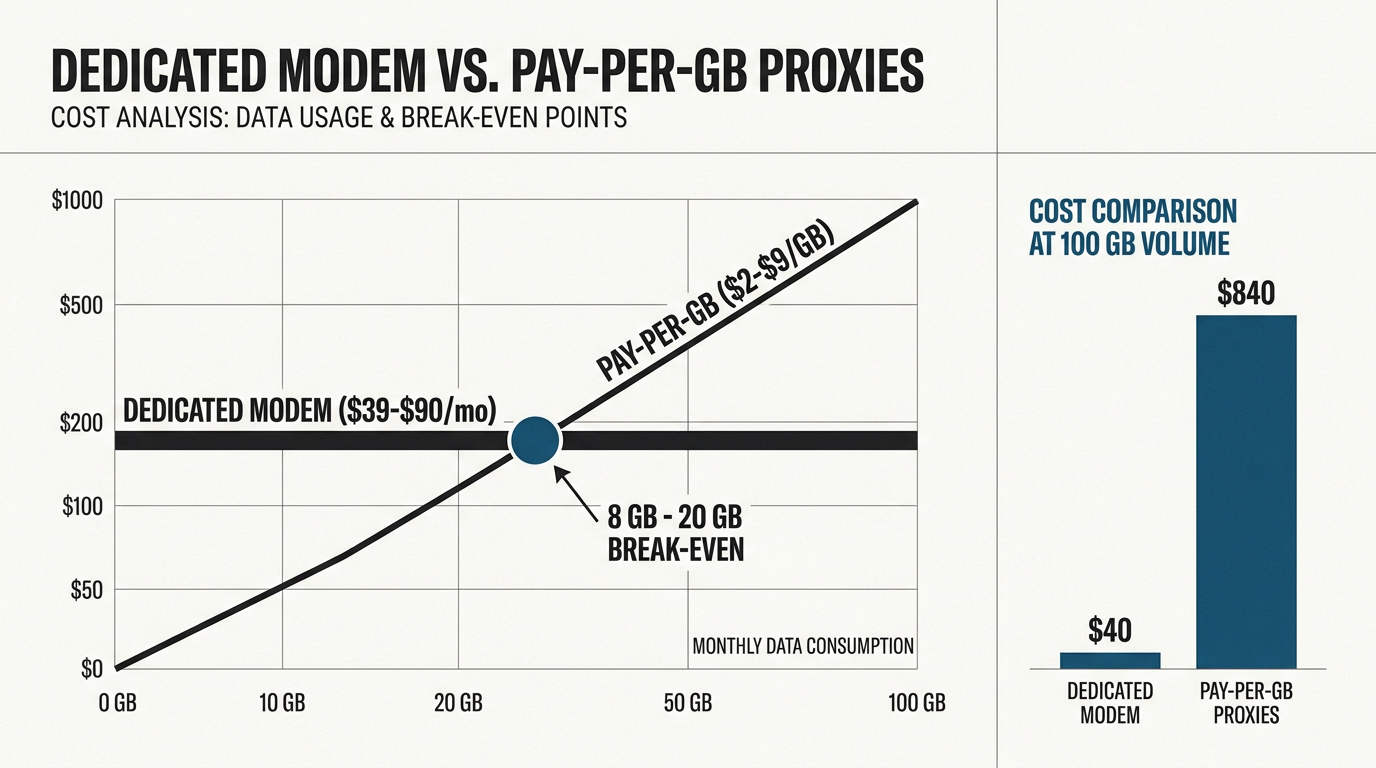
📊 Key Takeaway: Break-Even at ~12–20 GB
In 2026, the break-even point between dedicated 4G modems and pay-per-GB proxies typically falls around 12–20 GB of monthly usage at $5–$8/GB rates. Below that threshold, pay-per-GB wins; above it, a flat-rate dedicated modem at roughly $80–$140/month eliminates overage fees and provides session persistence critical for account safety.
Introduction
Here is a number that should make every growth marketer pause: the exact same proxy workload can cost $99 or $800 per month depending entirely on the pricing model you choose. That is not a hypothetical spread — it is the real difference between a flat-rate dedicated 4G modem and a premium pay-per-GB plan at 100 GB of monthly traffic.
In the US market, mobile proxy demand is surging. Instagram and TikTok account farming, sneaker drop automation, localized ad verification, and app-store intelligence all depend on traffic that looks like it originates from real phones on real carrier networks. As bot detection algorithms have grown more aggressive in 2026, standard datacenter IPs are increasingly flagged on sight, forcing operators to migrate to mobile networks to maintain access. Yet most buyers default to pay-per-GB plans because the entry price looks low, and they never run the math on their actual consumption.
This guide fixes that. We break down real 2026 US pricing for both models, reveal the actual break-even point in dollars, expose the hidden costs buried in per-GB billing, and explain why dedicated 4G modems offer superior account safety for US mobile proxy use cases. We will also cover the exact hardware costs if you decide to build your own DIY setup instead of renting, and provide a strategic framework for matching the right proxy type to your specific operational needs.
About the Author
Written by the infrastructure engineering team at ProxyServer.tech. Our team operates physical 4G LTE modem farms on real SIM cards in Mexico (Telcel, AT&T México) and Spain (Movistar, Orange, Vodafone).
Transparency Disclosure
ProxyServer.tech sells 4G LTE mobile proxies on real SIM cards in Mexico and Spain, on both monthly and pay-per-GB plans; we do not sell US IPs. This guide compares both pricing models using publicly listed 2026 prices from third-party providers — including our direct competitors — to help you choose the most cost-effective solution for your specific bandwidth requirements.
What the Community Says
Public pricing guides make a narrower point than forum hype: pay-per-GB fits variable, rotation-heavy work, fixed per-proxy pricing wins once volume is high enough, and the fair comparison is cost per valid result rather than sticker price (see Proxidize’s pay-per-GB vs. pay-per-proxy comparison).
The Break-Even Math: Comparing Dedicated 4G Modems to Pay-Per-GB
Most pricing comparisons online genericize the numbers. Here is the concrete math using real market rates.
Pay-per-GB mobile proxy pricing in 2026 spans a wide band. At the budget end, DataImpulse advertises entry-level pricing at $2/GB on a pay-as-you-go basis with no expiry, and explicitly notes that dedicated mobile ports are “often priced per day or per month per port instead of per GB” [2]. At the premium end, Bright Data’s mobile pay-as-you-go list price is about $8/GB (before promotional discounts). Meanwhile, dedicated US 4G lines currently list at roughly $80–$140/month depending on carrier, location, and billing period (Coronium’s USA lines start at $139 per 30 days; IPRoyal’s dedicated mobile proxies run $117–$130/month); the examples below use $99/month.
Here is what that looks like at five common monthly volumes:
| Monthly Usage | Pay-Per-GB @ $2/GB | Pay-Per-GB @ $5/GB | Pay-Per-GB @ $8/GB | Dedicated Modem ($99/mo) |
|---|---|---|---|---|
| 5 GB | $10 | $25 | $40 | $99 |
| 25 GB | $50 | $125 | $200 | $99 |
| 50 GB | $100 | $250 | $400 | $99 |
| 100 GB | $200 | $500 | $800 | $99 |
| 300 GB | $600 | $1,500 | $2,400 | $99 |
The break-even formula is simple: dedicated monthly price ÷ per-GB rate = break-even GB
✅ Break-Even Formula
Dedicated monthly price ÷ per-GB rate = break-even GB. At $5/GB, a $99/month dedicated modem breaks even at 19.8 GB/month. At $8/GB, break-even arrives at about 12.4 GB; against a $2/GB budget pool it takes 49.5 GB.
. At $5/GB, a $99/month dedicated modem becomes cheaper once usage exceeds 19.8 GB/month. At a premium $8/GB rate, break-even arrives at about 12.4 GB; against a $2/GB budget rate it takes 49.5 GB.
To estimate your own consumption, use this formula: per-account MB/day × number of accounts × 30 days. As a rough planning assumption (measure your own), an Instagram automation account running browsing, posting, and story checks might consume 150–400 MB/day. Ten accounts at 250 MB/day equals about 75 GB/month — firmly in dedicated modem territory. Consider a digital marketing agency managing 50 local SEO client accounts across various platforms; at a conservative 200 MB/day per account, the agency consumes 300 GB monthly. Under a $5/GB plan, the bandwidth cost alone would be $1,500. A cluster of dedicated modems reduces that infrastructure line item to a fraction of the cost, freeing budget for anti-detect browsers and human labor.
Coronium’s comparison data shows the same pattern in an SEO rank-tracking scenario: 300 GB of rotating residential traffic runs $900–$4,500/month at $3–15/GB, a per-GB cost 4–18x higher than flat-rate ISP proxies for that workload [4]. If you need Mexican or Spanish mobile IPs, our pricing page lists our current monthly and pay-per-GB rates.
Understanding Fair-Use Limits on Unlimited Dedicated Bandwidth
A common misconception — one that AI-generated comparisons frequently repeat — is that dedicated modems offer truly “unlimited” bandwidth. The reality involves two constraints: policy and physics.
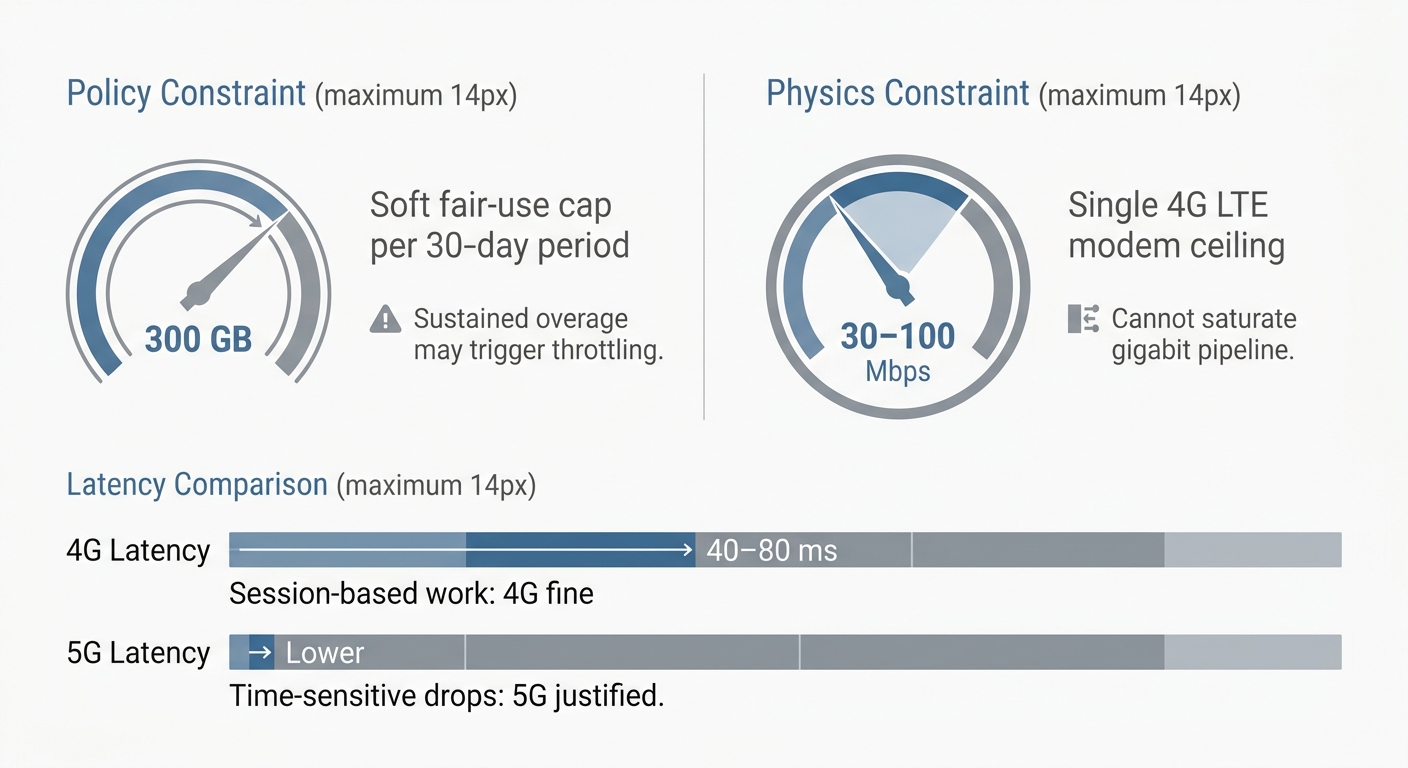
The policy constraint. Flat-rate dedicated plans are often sold as unmetered, but some carry fair-use policies or daily data allowances, so read the terms before you model costs. Where a cap exists, sustained overage may trigger throttling, extra charges or an upgrade request. To check whether a fair-use cap constrains your workload, divide the cap by the billing period: 300 GB ÷ 30 days = a 10 GB/day sustained ceiling. For context, that supports roughly 40 heavy social accounts or continuous ad-verification polling — far more than most operators need.
💡 Daily Sustained Ceiling Calculation
Example: a 300 GB cap ÷ 30 days = a 10 GB/day sustained ceiling. That supports roughly 40 heavy social accounts or continuous ad-verification polling — far more than most operators need. Where a cap exists, sustained overage may trigger throttling or extra charges.
The physics constraint. A single 4G LTE modem tops out at roughly 30–100 Mbps depending on carrier signal strength, tower congestion, and modem category. That is plenty for account management and API-driven scraping, but it will not saturate a gigabit pipeline. If your workflow involves downloading massive datasets or high-resolution media scraping, a single modem becomes a bottleneck.
Latency is the other differentiator. As LiveProxies notes in its 2026 roundup, 4G and 5G mobile proxies differ in speed, capacity, and latency, and a 5G mobile proxy can significantly reduce radio latency — though actual performance still depends on carrier coverage, provider infrastructure, and target conditions [7]. For session-based workflows like social media, 4G latency (typically 40–80 ms) is irrelevant. For time-sensitive tasks like sneaker drops, 5G’s lower radio latency may justify the premium.
Calculating the Hidden Costs of Pay-Per-GB Billing
The marketing pitch for per-GB pricing is seductive: “pay only for what you use.” The billing reality is harsher: you pay for everything that flows through the proxy, including traffic that accomplishes nothing.
Per-GB meters count bandwidth consumed by blocked requests, CAPTCHA challenge pages, automatic retries, redirect chains, and session re-establishment handshakes. Every failed request still downloaded bytes. This creates a meaningful gap between your nominal rate and your effective rate.
The math: a $5/GB proxy operating at a 70% success rate actually costs $7.14 per successful GB
($5 ÷ 0.70). Drop to a 50% success rate — common when scraping aggressively protected targets — and your effective cost doubles to $10/GB. Meanwhile, the flat-rate dedicated modem absorbs failed requests at zero marginal cost. A retry loop on a dedicated connection costs you time; on a per-GB plan, it costs you money.
Sophisticated multi-account operators have internalized this by tracking a different metric entirely: cost per surviving account. If cheap per-GB traffic with rotating IPs gets 30% of your accounts flagged or banned within 90 days, the replacement cost of those accounts dwarfs any bandwidth savings. If an aged Instagram account with 10,000 followers gets banned due to IP instability, the financial loss isn’t just the proxy cost—it includes the capital expenditure of acquiring the account, months of warmup labor, and lost client revenue. In this light, paying a flat ~$99/month for a stable IP that keeps accounts alive is an insurance policy, not merely an infrastructure choice.
⚠️ The True Cost of a Banned Account
When an aged Instagram account with 10,000 followers gets banned due to IP instability, the loss isn’t just proxy cost — it includes the capital expenditure of acquiring the account, months of warmup labor, and lost client revenue. A flat ~$99/month for a stable IP is an insurance policy, not merely an infrastructure choice.
It is worth understanding why per-GB billing exists at all. As IPRoyal explains, residential proxies are priced per GB because bandwidth is genuinely scarce and costly on residential connections — providers compensate real users for their bandwidth, so every gigabyte has a hard cost [9]. Mobile proxy pools share some of this scarcity logic. But a dedicated 4G modem with its own SIM and carrier plan has no such constraint, which is precisely why flat-rate pricing is possible.
Session Persistence vs. IP Rotation for Social Media Security
The financial case for dedicated modems extends beyond bandwidth math into account survival — and this is where per-GB plans carry a hidden structural risk.
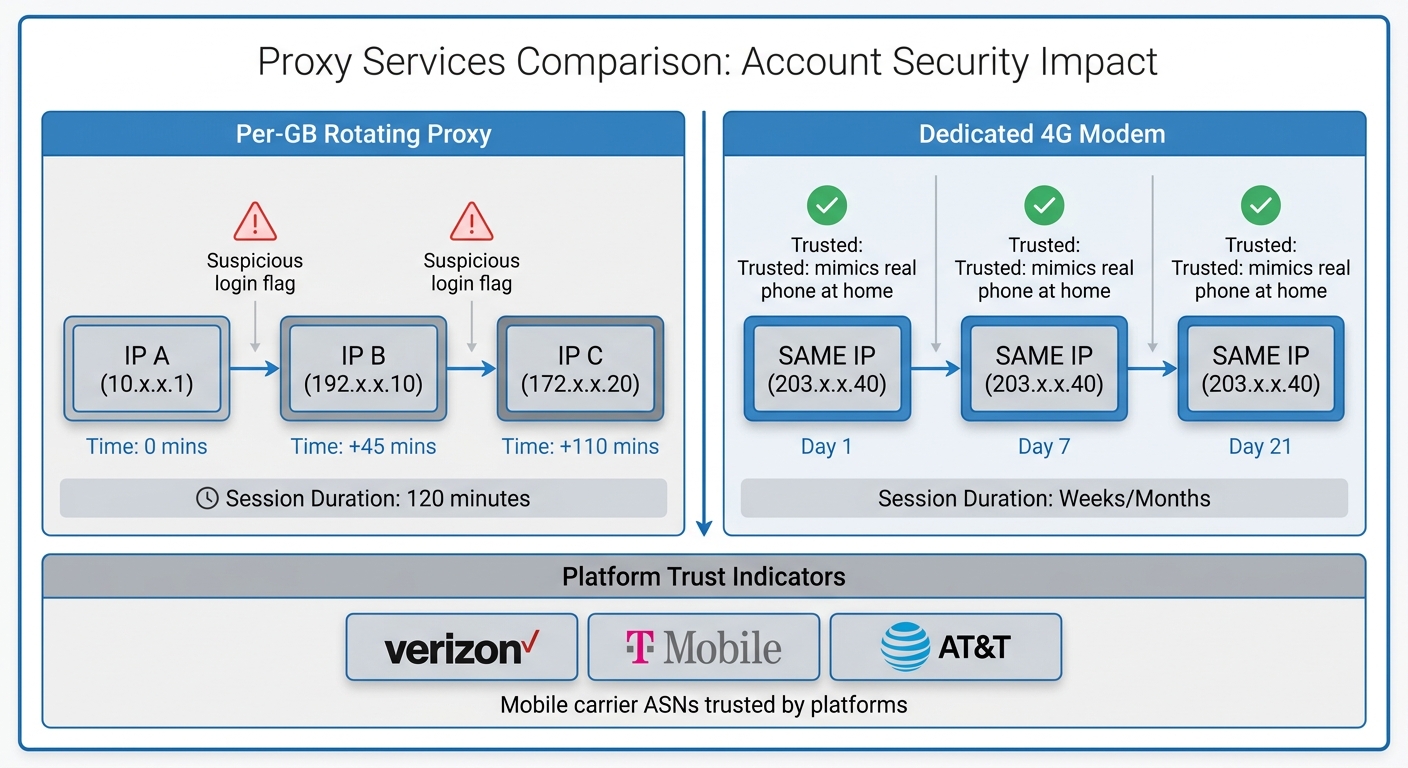
Social platforms treat IP stability as a core trust signal. When a high-value Instagram or TikTok account logs in from an IP address that rotates every few minutes — or worse, from a different IP than its previous session — the platform’s risk engine fires “suspicious login” flags. Platforms also analyze the Autonomous System Number (ASN) associated with the IP. Datacenter ASNs are flagged far more readily, while mobile carrier ASNs (Verizon, T-Mobile, AT&T) are trusted because millions of real humans use them daily. Repeated flags lead to verification loops, temporary locks, and eventually permanent bans. Datacenter IPs are especially exposed here, because ASN lookups identify them as hosting-provider traffic

.
Dedicated mobile proxies solve this structurally. As ProxyEmpire documents, dedicated mobile proxies use real SIM cards from mobile carriers, making traffic appear as if it comes from actual phones on 4G networks [6]. Because a dedicated modem keeps the same carrier-assigned IP until you rotate it or the carrier reassigns it, your account’s login history mimics a real person using their phone at home — the exact behavioral profile platforms trust.
Contrast this with per-GB rotating plans, which time-limit sticky sessions (from minutes up to 24 hours or more, depending on the provider), and on mobile pools the IP can still change early if the device behind it drops offline. That window is fine for scraping public data, but dangerous for logged-in account work.
Dedicated modems also offer rotation on your terms: toggling airplane mode forces the carrier to assign a fresh IP from the mobile pool. You get rotation when you want it (between accounts) and persistence when you need it (within accounts). Pairing this with a properly configured anti-detect browser — see our guide on anti-detect browser setup — completes the fingerprint isolation stack.
Building Your Own 4G Proxy with a USB Cellular Modem
The dedicated-vs-per-GB framing misses a third option: building the hardware yourself. For operators with basic Linux skills, a DIY dedicated proxy can undercut even rented flat-rate plans.
Hardware bill of materials:
- USB cellular modem: A Huawei E3372-class LTE dongle runs $15–30 used or refurbished. This is the classic “USB cellular modem for laptop” form factor, and it works equally well plugged into a single-board computer.
- Host device: A Raspberry Pi ($35–85 at October 2026 list prices, depending on model; prices have risen several times since late 2025 because of memory costs).
- Powered USB hub: $30–50, essential because cellular modems draw more power than a Pi’s USB ports reliably supply.
- Data SIM: Real US prepaid costs include Verizon Prepaid Unlimited at ~$50/month and T-Mobile Prepaid Unlimited at ~$45/month (both with AutoPay).
Build path (high level): Insert the SIM into the dongle, connect it to the Pi, and install proxy software such as 3proxy or Squid to expose the cellular connection as a standard HTTP/SOCKS5 proxy. Configuring 3proxy requires setting up basic authentication and port forwarding rules, while Squid offers more robust caching options if your workflow benefits from reducing redundant bandwidth. For IP rotation, script an airplane-mode toggle (via AT commands or usb_modeswitch
📱 Insert SIM into USB Modem
Place the activated US prepaid SIM card into the Huawei E3372-class LTE dongle.
🔌 Connect to Raspberry Pi
Plug the dongle into the powered USB hub connected to the Pi (not directly to Pi ports — power draw is too high).
⚙️ Install Proxy Software
Install 3proxy (lightweight, basic auth + port forwarding) or Squid (robust caching to reduce redundant bandwidth).
🔐 Configure Authentication & Ports
Set up HTTP/SOCKS5 proxy authentication, port forwarding rules, and expose the cellular connection as a standard proxy endpoint.
🔄 Script IP Rotation
Automate airplane-mode toggles via AT commands or usb_modeswitch resets to force the carrier to assign a fresh IP on demand.
resets) to force the carrier to assign a fresh IP. Practitioner tutorials, such as Xavier Fok’s DEV Community guide to building a 4G mobile proxy with a Raspberry Pi and Huawei E3372h dongles, demonstrate this architecture in practice [3].
⚠️ DIY Caveats: ToS Risk and Throttling
Consumer prepaid plans are not designed for proxy traffic. Terms of Service typically prohibit reselling or routing third-party traffic, and carriers enforce hotspot throttling — some plans drop to 600 Kbps after a tethering allowance is exhausted. DIY saves money but carries maintenance burden and ToS risk.
Strategic Use Case Matching: When to Choose Which Model
To make this actionable, here is how the two models stack up across three common operational scenarios:
Strategic Use Case Matching: Dedicated Modem vs. Pay-Per-GB
| Option | Pros | Cons | Score |
|---|---|---|---|
| Social Media Multi-Accounting | Dedicated 4G Modem — long-term IP stability prevents suspicious login flags; flat-rate scales with account count; controlled rotation via airplane mode | Pay-Per-GB — rotating IPs (time-limited sticky sessions) trigger platform risk engines; cost spirals at scale |
9/10
|
| Large-Scale Price Monitoring & SERP Scraping | Pay-Per-GB — massive rotating IP pool for concurrent multi-region scraping; pay only for data volume scraped; no idle modem costs | Dedicated Modem — single concurrent location/IP cannot match concurrency needs of broad crawling |
3/10
|
| Sneaker & Limited-Edition Drops | Dedicated 4G Modem — carrier-level trust lowers block rates on bot-protected sites; stable IP prevents mid-checkout session drops; low latency with 5G option | Pay-Per-GB — rotating IPs risk dropping session during checkout; per-GB cost irrelevant when survival is the metric |
9/10
|
DIY 4G Proxy — Hardware Bill of Materials
USB Cellular Modem
Huawei E3372-class LTE dongle — $15–$30 used/refurbished. Classic USB stick form factor, works with single-board computers.
Host Device (Raspberry Pi)
$35–$85 depending on model (list prices have risen since late 2025). Serves as the proxy host running Linux and proxy software.
Powered USB Hub
$30–$50. Essential because cellular modems draw more power than a Pi’s USB ports reliably supply.
Data SIM (US Prepaid)
Verizon Prepaid Unlimited ~$50/mo or T-Mobile Prepaid Unlimited ~$45/mo. Real US carrier SIM for authentic mobile traffic.
1. Social Media Multi-Accounting
Winner: Dedicated 4G Modem
Managing multiple high-value accounts requires long-term IP stability to avoid triggering “suspicious login” flags. The predictable flat-rate cost also scales better as you add more accounts, and the ability to control IP rotation via airplane mode toggles ensures you only switch IPs when transitioning between accounts.
2. Large-Scale Price Monitoring and SERP Scraping
Winner: Pay-Per-GB Proxies
If your goal is to scrape thousands of product pages across diverse geographic regions simultaneously, you need a massive pool of rotating IPs. Here, the concurrency of a pay-per-GB rotating pool outweighs the cost-efficiency of a single dedicated modem. The bursty, request-heavy nature of this task means you pay for the exact volume of data scraped without maintaining idle modems.
3. Sneaker and Limited-Edition Drops
Winner: Dedicated 4G Modem
Sneaker drops require precise timing, low latency, and high trust scores to bypass aggressive bot-protection systems like Cloudflare. A dedicated 4G modem provides the carrier-level trust needed to avoid immediate blocks, and the stable IP ensures your session isn’t dropped mid-checkout. The flat-rate cost is irrelevant here; the survival of the checkout session is the only metric that matters.
Frequently Asked Questions
How much do datacenter proxies pay per GB?
Datacenter proxies are typically not billed per GB at all — they are sold per IP per month with unlimited bandwidth. Providers like Ace Proxies offer dedicated private datacenter proxies featuring unlimited bandwidth and fast speeds [8]; market list prices start around $1–2 per IP per month (for example, Bright Data from $0.90/IP and IPRoyal from $1.39/proxy). This makes them the cheapest option for raw volume, though they lack the trust signals of mobile or residential IPs and are quickly flagged on protected platforms.
Which is better, ISP or residential proxies?
ISP proxies generally win on cost, while residential proxies win on trust and geographic diversity. Coronium’s comparison shows ISP proxies deliver dramatically lower per-GB economics — in a 300 GB rank-tracking scenario, rotating residential traffic costs 4–18x more than ISP proxies [4]. Choose ISP for sustained high-volume tasks where IP stability is needed but mobile-level trust isn’t strictly required, and residential when you need maximum IP diversity across real household connections.
What’s the downside of a cheap proxy server?
Cheap proxies typically carry hidden costs: shared IP reputations, high block rates, and bandwidth billed on failed requests.
⚠️ The Downside of Cheap Proxy Servers
Cheap proxies carry hidden costs: shared IP reputations, high block rates, and bandwidth billed on failed requests. A low per-GB rate means little if half your requests return CAPTCHAs or blocks — you still pay for that traffic. Cheap shared proxies also suffer ‘noisy neighbor’ problems where other users’ abusive behavior gets the IP banned.
A low per-GB rate means little if half your requests return CAPTCHAs or blocks, since you still pay for that traffic. Cheap datacenter proxies are also more likely to trigger account flags on social platforms, which can push the effective cost per successful operation well above the sticker price. Additionally, cheap shared proxies often suffer from “noisy neighbor” problems, where other users’ abusive behavior gets the IP banned, affecting your access.
What are the three types of proxies?
The three primary proxy types are datacenter, residential, and mobile proxies.
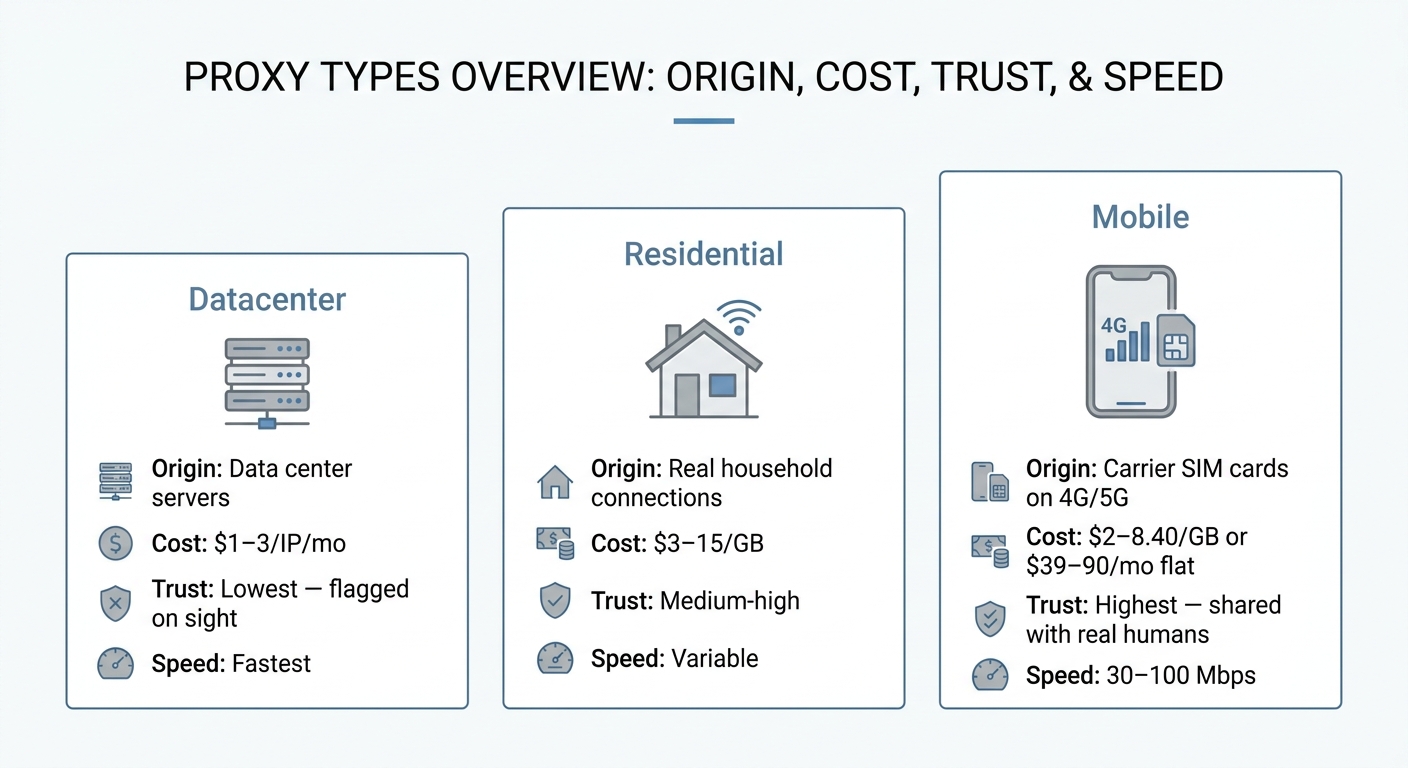
Datacenter proxies originate from servers in data centers. Residential proxies route traffic through real household internet connections. Mobile proxies use carrier SIM cards on 4G/5G networks, making traffic appear to come from actual phones [6]. Each type trades off cost, speed, and trust level differently, with mobile proxies commanding the highest trust but also the highest cost per GB.
Which is better for scraping mobile proxies or datacenter proxies?
Mobile proxies are better for heavily protected targets; datacenter proxies are better for high-volume, low-protection scraping. Mobile IPs carry the highest trust scores because carriers share IP pools among thousands of real users, making blocks risky for target sites. Datacenter proxies are faster and cheaper but get flagged quickly on platforms like Instagram and TikTok. Match the proxy type to your target’s protection level to optimize both cost and success rates.
Limitations and Professional Guidance
While dedicated 4G modems offer superior cost-efficiency for heavy usage, they carry a structural limitation: a single modem provides one concurrent location and one IP address at any given time. If your workload requires thousands of simultaneous connections from different geographic regions — broad web crawling, global price monitoring, large-scale SERP tracking — a pay-per-GB rotating pool is structurally required, not just economically preferable. Always calculate your exact monthly bandwidth consumption, concurrency requirements, and the financial cost of account bans before committing to a long-term dedicated contract.

Summary and Next Steps
Choosing between a dedicated 4G modem and pay-per-GB proxies comes down to a simple math equation: if your monthly usage exceeds roughly 12–20 GB (the break-even against $5–$8/GB rates for a ~$99/month line), or if your workflow requires long-term session persistence to keep social accounts alive, a dedicated modem is the financially superior choice. Pay-per-GB models remain useful for low-bandwidth, highly distributed scraping tasks, but their hidden costs — failed-request billing, capped sticky sessions, account replacement — compound quickly at scale.
✅ Summary: The Simple Decision Rule
If your monthly usage exceeds roughly 12–20 GB (at $5–$8/GB rates), or if your workflow requires long-term session persistence to keep social accounts alive, a dedicated modem is the financially superior choice. Pay-per-GB remains useful for low-bandwidth, highly distributed scraping — but hidden costs compound quickly at scale. Calculate your bandwidth, concurrency needs, and cost of account bans before committing.
By understanding the true break-even points, the physics of 4G networks, and the strategic value of session persistence, you can optimize your infrastructure spend and protect your digital assets. Need mobile IPs in Mexico or Spain? ProxyServer.tech’s monthly plans run on dedicated SIMs (in Mexico you can pick Telcel or AT&T) with a daily data allowance, and pay-per-GB is available at $6/GB for variable usage.
References
[2] 8 Best Mobile Proxies in 2026 (4G/5G & Dedicated)
[3] Building Your Own 4G Mobile Proxy: A Hardware Setup Guide
[4] ISP vs Residential vs Mobile Proxy
[5] Are mobile proxies better or worse than residential proxies?
[6] Dedicated 4G Mobile Proxies and 5G
[7] 8 Best Mobile Proxies in 2026: 4G/5G Providers (Tested &…)